OneDrive AI: Research Across Every Model, Beyond the Microsoft Ecosystem
Research across the files you keep in OneDrive.
In short
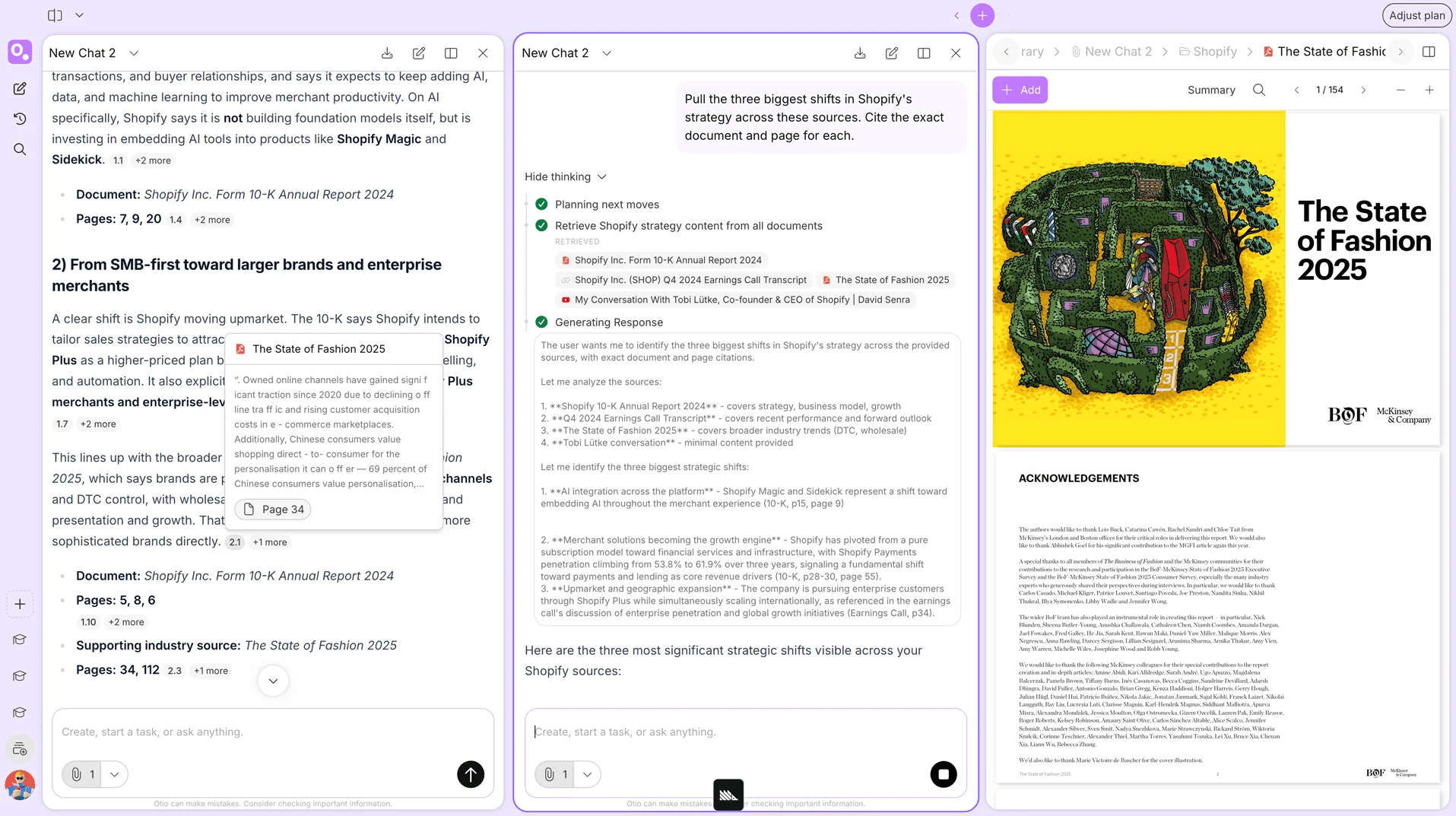
Otio is an AI research assistant, and this page covers its OneDrive integration. You connect OneDrive with a secure read-only OAuth connection, import the PDFs, Word, PowerPoint and Excel files you choose, and question them with Claude, GPT, Gemini, DeepSeek, Grok, Kimi or Llama. Answers can span OneDrive files, web articles, videos and podcasts, and are cited to the exact page or timestamp.
- 200,000+professionals, researchers and analysts
- 74languages
Your OneDrive Files, Every AI Model
Connect Otio to OneDrive and choose the AI model that interprets your documents best. Claude, GPT, Gemini, DeepSeek, Grok, Kimi, Llama, not locked to Copilot's model choices.
How it compares
Research That Starts in OneDrive but Extends Beyond Microsoft
Copilot Is Excellent for Microsoft-Native Workflows
Microsoft Copilot integrates deeply with Office, SharePoint, and Teams.
MoreLess
For document tasks within the Microsoft 365 ecosystem, it's a genuinely strong solution. The limitation appears when research extends beyond Microsoft's boundaries: PDFs from other platforms, web articles, YouTube interviews, academic databases, and external sources that Copilot can't connect.
Your Research Doesn't Stop at the Microsoft Boundary
OneDrive stores work documents, but research projects often involve sources Copilot can't see.
MoreLess
Web articles, video transcripts, podcasts, CSVs from external databases, and academic papers from non-Microsoft repositories. Otio connects OneDrive files with every other source type in one research workspace. One question across all of them, every answer cited back to the exact page or timestamp.
Model Choice That Copilot Doesn't Provide
Copilot uses Microsoft's AI models. Otio gives OneDrive users access to Claude, GPT (outside Copilot's version), Gemini, DeepSeek, Grok, Kimi, and Llama.
MoreLess
Choose the model that interprets your documents best. Switch models mid-session if one handles technical language better or provides clearer synthesis. Not locked to a single provider's approach.
Complementary Tools, Not Competing Ones
Use Copilot for Microsoft-ecosystem tasks: drafting emails in Outlook, summarizing Teams meetings, formatting documents in Word.
MoreLess
Use Otio for cross-platform research that spans beyond those boundaries. They serve different workflows. Copilot for Microsoft-native work, Otio for research that requires model flexibility and cross-source synthesis with cited answers.
How it works
Connect OneDrive to Otio in Three Steps
- 1
Connect Your OneDrive Account
Authorize Otio to access your OneDrive library through a secure OAuth connection.
MoreLess
Select the folders or files you want to import into your research workspace. The connection is read-only. Otio imports copies of your selected files for research purposes and does not modify or delete anything in your OneDrive account.
- 2
Import Files Into Your Otio Library
Choose which OneDrive documents to add to your Otio workspace.
MoreLess
PDFs, Word docs, PowerPoint slides, Excel files, all supported formats import directly. No download-upload cycle. Files move from OneDrive to Otio in one click and are immediately available for cross-document querying.
- 3
Query Across Your OneDrive Files and Any Other Sources
Ask questions across your imported OneDrive library, web articles, YouTube videos, podcasts, and any other sources in the same workspace.
MoreLess
Every answer cites the exact page, passage, or timestamp. Switch AI models mid-session if one handles your documents better. Claude for nuanced synthesis, GPT for structured summaries, Gemini for multimodal content, choose what works best for each query.
Your OneDrive Files Stay Secure
Documents imported from OneDrive are used only for research within your workspace. They are not used for AI model training, and they are not shared with other users. Otio's security practices align with enterprise standards. Your research stays private, your sources stay cited, and your OneDrive connection remains under your control.
Choose the Model That Interprets Your Documents Best
Claude for Nuanced Synthesis and Long-Context Documents
Claude excels at synthesizing themes across lengthy documents and handling complex, multi-layered arguments.
MoreLess
Use it when your OneDrive files contain dense research, legal briefs, or policy documents that require careful interpretation. Claude's extended context window handles entire document sets simultaneously, making it ideal for literature reviews or cross-document analysis where context matters more than speed.
Not Locked to Copilot's Model Choices
Copilot uses Microsoft's AI models exclusively. Otio gives OneDrive users access to every major model in one workspace, with the ability to compare outputs and choose the best interpretation for each query.
MoreLess
Model flexibility matters when research quality depends on nuanced understanding, multilingual support, or specialized domain knowledge that a single model can't cover.
DeepSeek, Grok, Kimi, and Llama for Specialized Tasks
DeepSeek for technical and scientific documents, Grok for real-time data integration, Kimi for multilingual research, Llama for open-source flexibility.
MoreLess
Each model brings strengths that matter for specific document types or research goals. Switch models mid-session based on what you're querying. Start with Claude for synthesis, switch to GPT for structured output, and use Gemini when you hit a visual-heavy section. Otio makes model choice easy.
Gemini for Multimodal Content and Visual Analysis
Gemini handles documents that combine text, images, charts, and diagrams.
MoreLess
Use it when your OneDrive files include data visualizations, infographics, or technical diagrams that require visual interpretation. For research that spans multiple formats, PDFs with embedded charts, PowerPoint decks with visual data, Excel files with complex tables, Gemini connects the visual and textual layers.
GPT for Structured Summaries and Actionable Outputs
GPT delivers clear, structured summaries and works well for extracting key points, creating outlines, or generating actionable insights from meeting transcripts and client briefs.
MoreLess
When your OneDrive files need to become deliverables, reports, presentations, or executive summaries, GPT's formatting and clarity make it the go-to choice.
OneDrive Files Alongside Every Other Source Type
-
CSVs, Data Files, and Visualizations
Upload data files and CSVs alongside your OneDrive documents.
MoreLess
Extract specific figures, create visualizations, and query across quantitative and qualitative sources in one session. When research involves both narrative documents and raw data, Otio connects them. Ask questions that span both layers and get answers that cite the exact row, column, or passage.
-
OneDrive Documents Plus Web Articles and Research Papers
Import OneDrive files alongside web articles, academic papers from PubMed or arXiv, and PDFs from other platforms.
MoreLess
Query across all of them simultaneously, and every answer cites the exact source. Research projects rarely live in one platform. Otio connects your OneDrive library with every other source type, so you're not switching tools or losing context mid-session.
-
YouTube Videos and Podcast Transcripts
Add YouTube videos and podcast episodes to the same workspace as your OneDrive files.
MoreLess
Otio transcribes the audio, indexes the content, and lets you query across video, audio, and text sources together. Extract key arguments from a 2-hour interview, cross-reference them with your OneDrive briefs, and get cited answers that trace back to the exact timestamp or page.
-
One Question Across Everything, Every Answer Cited
Ask a single question across your OneDrive files, web articles, YouTube videos, podcasts, CSVs, and academic papers.
MoreLess
Otio synthesizes answers from all sources and cites each claim back to the exact page, timestamp, or data point. Cross-source synthesis is where Otio diverges from Copilot. Copilot handles Microsoft content; Otio handles research that crosses every platform boundary.
-
Google Drive, Zotero, Mendeley, Dropbox, and Box
Connect OneDrive alongside Google Drive, Zotero, Mendeley, Dropbox, and Box.
MoreLess
Import files from multiple cloud storage platforms into one Otio workspace and query across all of them. Research doesn't respect platform boundaries. Otio connects every major storage and reference management system, so your sources live in one queryable library regardless of where they're stored.
Query Across Your Entire OneDrive Library Simultaneously
One Question, Every Document, Cited Answers from Each
Import 60 OneDrive files into your Otio workspace and ask one question across all of them.
MoreLess
Otio pulls key findings, quotes, and themes from every document and cites each claim back to the exact page and passage. Cross-library synthesis turns document piles into structured starting points. Instead of reading 60 papers individually, you start from a synthesis that shows you where the key arguments live.
Literature Reviews in a Fraction of the Time
Upload your OneDrive research library, papers, reports, briefs, and ask Otio to pull themes, contradictions, and consensus points across everything.
MoreLess
Every answer cites the exact source, so you can verify before you write. Literature reviews that used to take weekends now take hours. The synthesis is structured, the citations are exact, and you're building from a foundation instead of a blank page.
Client Briefs, Meeting Transcripts, and Deliverable Prep
Upload 30 client documents from OneDrive, meeting transcripts, reports, briefs, and ask Otio to pull key points and themes across everything.
MoreLess
Get a structured summary you can build your deliverable on, in a fraction of the time. Consultants and analysts use Otio to turn document piles into actionable insights. The synthesis is cited, the themes are grouped, and the deliverable starts from structure instead of scattered notes.
Discovery Piles, Case Files, and Compliance Docs
Upload case files, depositions, and compliance documents from OneDrive.
MoreLess
Ask Otio to pull key facts, themes, and contradictions across documents. Every answer traced back to the exact source; verify everything before it leaves your desk. Legal professionals rely on Otio for discovery work that demands cited accuracy. The synthesis is fast, the citations are exact, and the verification is one click away.
How it compares
Research That Crosses Beyond the Microsoft Ecosystem
Copilot Stays Within the Microsoft Ecosystem
Copilot integrates with Office, SharePoint, Teams, and OneDrive.
MoreLess
For tasks within that ecosystem, drafting emails, summarizing meetings, formatting documents, it's a strong solution. The boundary appears when research extends beyond Microsoft: web articles, YouTube videos, academic papers from non-Microsoft repositories, PDFs from other platforms. Copilot can't connect these sources. Copilot uses Microsoft's AI models. Otio gives OneDrive users access to Claude, GPT, Gemini, DeepSeek, Grok, Kimi, and Llama, every major model in one workspace.
Use Both for Different Workflows
Copilot for Microsoft-native tasks: drafting emails in Outlook, summarizing Teams meetings, formatting documents in Word.
MoreLess
Otio for cross-platform research that spans beyond those boundaries. They're complementary tools. Copilot handles Microsoft-ecosystem work; Otio handles research that requires model flexibility, cross-source synthesis, and cited answers from non-Microsoft content. OneDrive documents sit alongside web articles, YouTube videos, podcasts, CSVs, and academic papers in one Otio workspace. Research that starts in OneDrive rarely stays there.
Cited Synthesis Across Non-Microsoft Content
Copilot summarizes Microsoft content. Otio synthesizes across OneDrive files, web articles, YouTube videos, podcasts, and academic papers, and cites every claim back to the exact page, timestamp, or passage.
MoreLess
When research quality depends on cited accuracy and cross-source synthesis, Otio provides what Copilot doesn't: verifiable answers that trace back to the exact source, regardless of platform.
Researchers, Consultants, Lawyers, Analysts, and Journalists Rely on Otio
Master's students, PhD researchers, pharmaceutical researchers, post-docs, ESG analysts and professionals managing information overload describe Otio in the testimonials below.
Your OneDrive Files Stay Secure and Private
-
Read-Only Access to Your OneDrive Account
Otio connects to OneDrive through a secure OAuth connection with read-only permissions.
MoreLess
The integration imports copies of your selected files for research purposes and does not modify or delete anything in your OneDrive account. Your OneDrive library remains under your control. Disconnect the integration at any time, and Otio's access is immediately revoked.
-
Your Documents Are Not Used for Model Training
Documents imported from OneDrive are used only for research within your workspace.
MoreLess
They are not used for AI model training, and they are not shared with other users or third parties. Your research stays private. Your sources stay cited. Your OneDrive connection remains secure and under your control.
-
Private Workspaces for Individual and Team Research
Each Otio workspace is private by default. Your imported OneDrive files, queries, and synthesis outputs are visible only to you unless you explicitly share them with team members.
MoreLess
For teams, Otio supports shared workspaces with role-based access controls. Invite collaborators, set permissions, and maintain control over who sees which documents and research outputs.
-
Enterprise-Grade Security Practices
Otio's security practices align with enterprise standards. Data encryption in transit and at rest, secure OAuth integrations, and compliance with industry best practices for data handling and privacy.
MoreLess
Your OneDrive files are treated with the same security standards as any other source in Otio. Private, cited, and under your control.
In their words
What people say
As a master's student, @otio has been a game-changer for my thesis work. It's like having a personal research assistant available 24/7! Chatting with research articles and whole folders of content has saved me countless hours of reading and digging through papers.
Masters Student
@otio is really an excellent tool for understanding my papers. It is just like my personal librarian for the internet!
Neuroscience PhD
I don't know how you do it but the gap in summary and answer quality to ChatGPT is big. And having real text citations is a game changer.
ESG Reporting Analyst
I took a 2 hour YouTube video and had the AI in Otio summarise it. I then asked follow-up questions about the highlighted pieces that got my attention. All told, I was able to collect key takeaways in less than 10 mins. Amazing.
Researcher
Questions
Frequently asked
How is Otio different from Microsoft Copilot for OneDrive?
Copilot is built for Microsoft-ecosystem workflows using Microsoft's AI models. It integrates deeply with Office, SharePoint, and Teams, and it's excellent for tasks within that ecosystem. Otio gives OneDrive users access to every AI model (Claude, GPT, Gemini, DeepSeek, Grok, Kimi, Llama) and connects OneDrive files with any other research source type in one workspace. For research that goes beyond the Microsoft ecosystem, web articles, YouTube videos, academic papers, podcasts, Otio provides cross-platform synthesis with cited answers.
Can I use both Copilot and Otio?
Yes, they're complementary tools. Copilot handles Microsoft-native workflows: drafting emails in Outlook, summarizing Teams meetings, formatting documents in Word. Otio handles research that extends beyond Microsoft to include PDFs from other sources, web articles, YouTube videos, academic papers, and more. Use Copilot for Microsoft-ecosystem tasks; use Otio for cross-platform research that requires model flexibility and cited synthesis.
How does the OneDrive-Otio integration work?
Connect your OneDrive account to Otio through a secure OAuth connection. Select the files or folders you want to import into your research library, and they're immediately available for cross-document querying. No manual download-upload cycle. Files move from OneDrive to Otio in one click, and you can query across your imported OneDrive library alongside any other sources in the same workspace.
Does Otio use my OneDrive files for model training?
No. Documents imported from OneDrive are used only for research within your workspace. They are not used for AI model training, and they are not shared with other users or third parties. Your research stays private. Your sources stay cited. Your OneDrive connection remains secure and under your control.
Can I combine OneDrive files with other research sources in one Otio session?
Yes. OneDrive documents sit alongside web articles, YouTube videos, podcasts, CSVs, and any other sources you add to the same Otio workspace. All sources are queryable together. Ask one question across your OneDrive files, web articles, and YouTube videos. Otio synthesizes answers from all sources and cites each claim back to the exact page, timestamp, or passage.
Which AI models can I use with my OneDrive files?
Every major AI model: Claude, GPT, Gemini, DeepSeek, Grok, Kimi, and Llama. Choose the model that interprets your documents best, and switch models mid-session if one handles your content better. Copilot uses Microsoft's AI models exclusively. Otio gives OneDrive users access to every model in one workspace, with the ability to compare outputs and choose the best interpretation for each query.
Are there file limits or model restrictions?
No. Unlimited sources across all tiers. Import as many OneDrive files as your research requires, combine them with any other format, and query the entire collection simultaneously. Every AI model is available on all plans. No feature gating, no model restrictions, no file caps. The full Otio research workspace from day one.
What file formats does Otio support from OneDrive?
PDFs, Word documents, PowerPoint slides, Excel files, and text files. All standard OneDrive formats import directly into Otio and are immediately available for cross-document querying. Combine OneDrive files with web articles, YouTube videos, podcasts, CSVs, and academic papers from other platforms. Otio handles every format in one workspace.


Bring ten sources. Ask one question.
That is enough to see whether Otio earns a place in your work. Free to start, no card.
Start free