AI Podcast Summarizer That Keeps Every Episode in Your Research Library
Turn an episode into notes and keep it in your library for follow-up questions.
In short
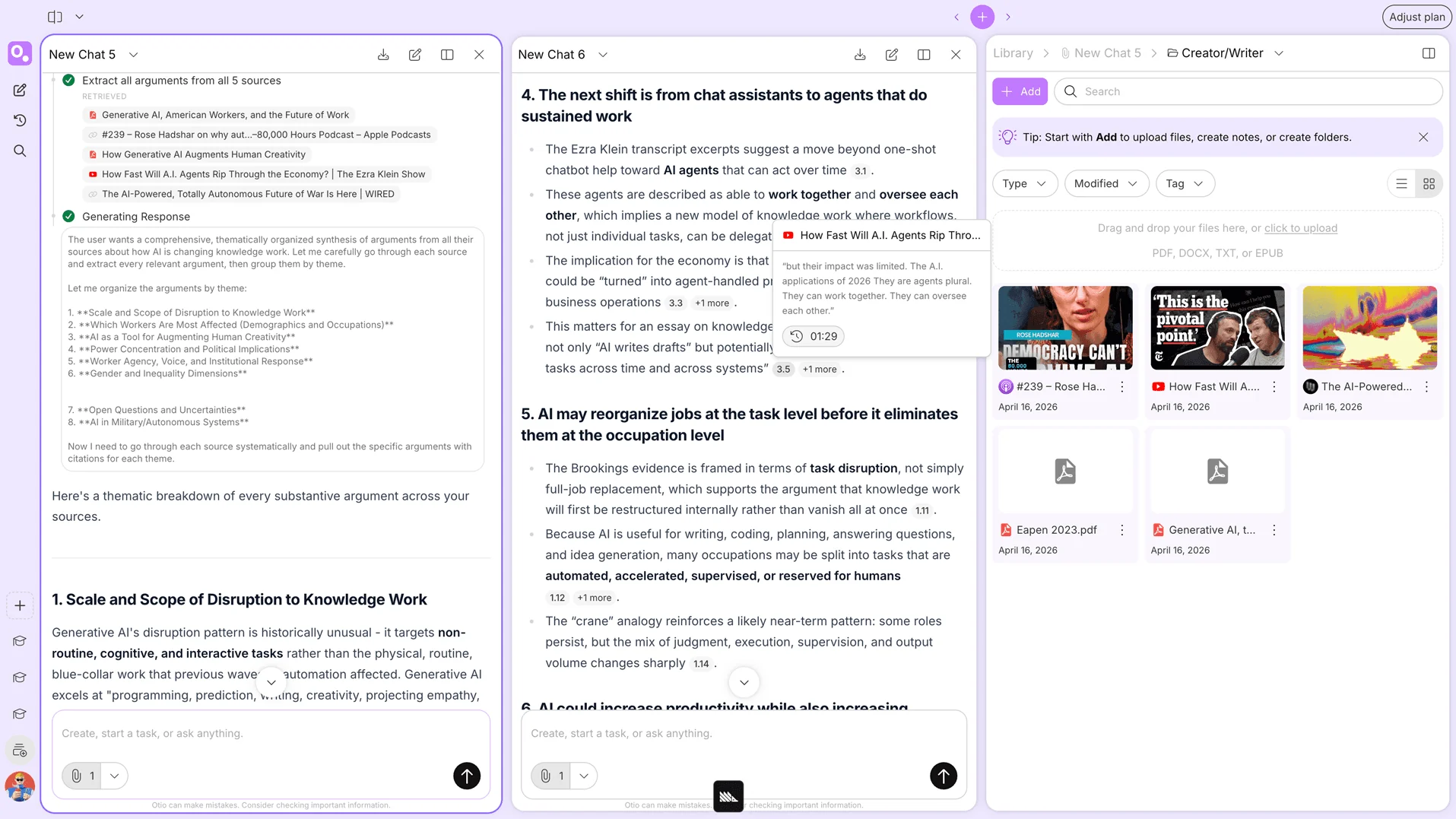
Otio is an AI research assistant that summarizes podcasts and keeps every episode in your research library. Paste a Spotify or Apple Podcasts URL, upload an MP3 file, or connect your RSS feed, then ask targeted follow-up questions weeks later. Answers are cited to the exact timestamp in the transcript, and you can question podcasts together with your PDFs, articles, videos and CSVs in one workspace.
- 200,000+professionals across 74 languages trust Otio
Built for Professionals Who Treat Podcasts as Research Sources
Permanent Library Storage
Every podcast you add to Otio is stored permanently. Ask a specific question about it next month, next quarter, or next year.
MoreLess
The episode you processed six weeks ago is still answering questions today. Dedicated podcast summarizers discard the content after the session.
Targeted Follow-Up Questions With Cited Answers
Not 'summarize this episode.' Ask: 'What did the guest say about X?' 'What recommendation did they make for Y?' 'How does their view compare to the paper I added last week?' Otio answers these with citations to the exact timestamp. Click the citation to verify the source in one step.
Multi-Format Ingestion in One Workspace
Podcasts, PDFs, articles, YouTube videos, CSVs. Upload 50+ sources in any format and interrogate them together.
MoreLess
The expert interview, the paper they cited, the article that covered their research. All in one Otio session.
Every AI Model Available
Choose the AI model best suited to your domain. GPT, Claude, Gemini, or another model in Otio's library.
MoreLess
Technical podcasts and niche topics get the accuracy they deserve. Not locked to a single model's interpretation.
Start Building Your Podcast Research Library Today
-
All Features. All AI Models. Free to Start.
Try Otio free. No credit card required. Experience the full product: unlimited sources, every AI model, cross-source querying, and permanent library storage.
MoreLess
The podcast you summarize today is still answering questions next month. That's the workspace advantage.
-
Upload Your First Podcast in Under 60 Seconds
Paste a Spotify or Apple Podcasts URL, upload an MP3 file, or connect your RSS feed.
MoreLess
Otio handles podcast content from any source. Ask your first question and see the cited answer. The episode is stored in your workspace, queryable indefinitely.
-
Join 200,000+ Professionals Who Learn Faster With Otio
Researchers, consultants, lawyers, analysts, journalists, and students across 74 languages rely on Otio to automate complex research workflows.
MoreLess
The tool is trusted by professionals who need accuracy, reliability, and a system that scales with their research.
Most Podcast Summarizers Tell You What Happened. Otio Lets You Ask What You Need to Know
Summaries Disappear. Libraries Answer Questions Indefinitely.
A generic summary tells you the episode covered three topics.
MoreLess
Six weeks later, when you need to know what the guest specifically said about one of them, the summary is useless. Otio stores the full transcript in your workspace. Ask targeted questions months after you listened and get cited answers from the exact timestamp.
The Backlog Isn't the Problem. The Lack of a System Is.
Professionals with 100+ saved episodes don't need to get through them faster.
MoreLess
They need what they process to be usable, not just consumed. Otio reframes the backlog as a library. Add the episodes worth extracting from, ask questions across all of them, and build a research asset instead of clearing a queue.
Podcasts as Research Inputs, Not Just Content
The expert interview is one source among many. Researchers, analysts, and journalists need to extract specific arguments from it and cross-reference what the guest said against papers and reports.
MoreLess
No dedicated podcast tool can do this. Otio treats audio as a first-class research source, stored permanently alongside your other materials.
What Did They Say About This Specific Topic?
Otio answers these with citations. Dedicated podcast summarizers cannot.
The Interview, the Paper They Referenced, the Article That Followed Up. All in One Session.
-
Audio Plus Everything Else
The podcast guest cited a research paper. The paper referenced a dataset. A follow-up article covered the controversy.
MoreLess
Bring all three into one Otio session. Ask questions across the podcast transcript, the PDF, and the article simultaneously. Every answer cites the exact source.
-
No Other Podcast Summarizer Can Connect Your Audio to Your Documents
Snipd, Podwise, and BibiGPT are built for single-episode summaries.
MoreLess
Otio is built for research workflows where podcasts sit alongside papers, reports, and videos. The interview you listened to last month connects to the PDF you're reading today. That's the workspace advantage.
-
Upload PDFs, Articles, Videos, Podcasts, or Connect Your Cloud Storage
Google Drive, Zotero, Mendeley, Dropbox, OneDrive, Box. Otio integrates with the tools researchers already use.
MoreLess
Podcast files, MP3s, YouTube videos, PDFs, CSVs. Every format in one workspace, queryable together.
-
Ask Questions Across Hundreds of Sources at Once
Pull key findings and quotes across 60 papers and 20 podcast episodes simultaneously.
MoreLess
Start your literature review from a structured synthesis, not a blank page. The content backlog problem becomes a library management problem, and Otio is built for that.
How it works
Four Steps From Podcast URL to Cited Answers
- 1
Upload Your Podcast
The episode is transcribed and stored in your workspace. No manual copy-pasting, no switching between tools.
- 2
Chat Across Your Sources With Any AI Model
Ask targeted questions about what the guest said. Choose the AI model best suited to your domain: GPT, Claude, Gemini, or another model in Otio's library.
MoreLess
Every answer cites the exact timestamp in the transcript. Click the citation to verify the source in one step.
- 3
Start From a Structured Synthesis, Not a Blank Page
Otio pulls key findings and quotes across all your sources.
MoreLess
The podcast, the paper it referenced, the article that followed up, all interrogated together. Export your synthesis when ready. The thinking is yours. Otio gets you there faster.
- 4
The Episode Stays in Your Library
Ask a specific question about it next month. Get a cited answer from the transcript.
MoreLess
The episode you processed in January doesn't disappear in February. Hundreds of episodes. One place. Queryable indefinitely.
Who it's for
Who Uses Otio to Summarize and Research Podcasts
More than a third of the sources researchers added to Otio in the last 30 days were audio or video - interviews, podcasts, lectures. Spoken content is now a major research input class, and Otio treats it as a first-class source alongside written material.
Researchers Building Literature Reviews
Upload 60 papers and 20 expert interviews. Ask Otio to pull key findings and quotes across everything, grouped by theme.
MoreLess
Start your literature review from a structured synthesis, not a blank page. Every answer cites the exact page and timestamp.
Analysts Processing Market Intelligence
The earnings call, the analyst podcast, the market report. Upload all three and interrogate them together.
MoreLess
Extract specific figures without reading every page yourself. The podcast you summarized six weeks ago is still answering questions today.
Journalists Tracking Sources and Quotes
The interview you recorded last month, the follow-up article, the background report.
MoreLess
Bring all three into one Otio session. Ask Otio to pull the exact quote you need, cited to the timestamp. Verify everything before it leaves your desk.
Students Managing Course Materials
Lecture recordings, assigned podcasts, supplementary videos.
MoreLess
Upload 50+ sources in any format and ask questions across all of them. Revisit important points precisely when you need them. The content you processed in September is still queryable in December.
Consultants Synthesizing Client Research
Upload meeting transcripts, industry podcasts, and client briefs.
MoreLess
Ask Otio to pull the key points and themes across everything. Get a structured summary you can build your deliverable on, in a fraction of the time.
Trusted by 200,000+ Professionals Across 74 Languages
Used by Researchers, Consultants, Lawyers, Analysts, Journalists, and Students
200,000+ professionals across 74 languages rely on Otio to learn faster, work smarter, and automate complex research workflows.
MoreLess
The tool is trusted by neuroscience PhDs, pharmaceutical researchers, post-doc researchers, and master's students building thesis work.
How it compares
How Otio Compares to Dedicated Podcast Summarizers
Snipd and Podwise Are Good for Episode Triage
Listener-focused tools like Snipd and Podwise excel at helping you decide whether to listen to an episode in full.
MoreLess
They're built for passive consumption, not research extraction. Otio goes further. Every episode you summarize stays in your research workspace and stays queryable. If podcasts are one part of your research alongside papers and reports, Otio connects all of them.
BibiGPT Offers Broad Platform Support but No Cross-Source Capability
BibiGPT supports 30+ platforms including YouTube and has a podcast-to-article feature.
MoreLess
It's more versatile than most podcast tools but still single-source oriented. Otio handles podcasts, PDFs, articles, videos, and CSVs in one workspace. The interview, the paper it referenced, the article that followed up, all interrogated together.
Snipcast Has Chat Capability but No Persistent Library
Snipcast offers fast summarization in 50+ languages and lets you chat with podcast content.
MoreLess
The chat capability is notable, but there's no persistent library or cross-format integration. Otio stores every podcast permanently. Ask a specific question about it next month. Get a cited answer from the transcript.
Notta Is Built for Transcription, Not Research Workflows
Notta excels at enterprise transcription for meetings and recordings.
MoreLess
It's strong for transcription accuracy but not specifically designed as a research workspace. Otio treats podcasts as first-class research sources, stored permanently alongside your other materials and queryable with any AI model.
Your Sources Stay Private. Your Data Stays Secure.
-
Otio Generates Answers Only From Your Uploaded Materials
Otio is designed to work with your sources, not around them.
MoreLess
It generates answers only from the material you've uploaded, cites every claim back to the exact source, and tells you when something isn't there. No hallucinated references. No invented authors or fake journals. Every answer is traceable to the exact page or timestamp.
-
Your Research Library Is Private
The podcasts, PDFs, and articles you upload to Otio are stored securely in your private workspace.
MoreLess
No one else has access to your sources or your queries. Professionals handling sensitive client documents, proprietary research, or confidential materials can trust that their data stays private.
-
Trusted by 200,000+ Professionals Across 74 Languages
Researchers, consultants, lawyers, analysts, journalists, and students rely on Otio to learn faster and work smarter.
MoreLess
The tool is used by professionals in fields where accuracy and reliability are non-negotiable: neuroscience, pharmaceuticals, ESG reporting, and legal discovery.
-
Try Free With No Account Required
Paste a podcast URL and see how Otio works before creating an account. No credit card, no commitment.
MoreLess
Experience the summarization quality, citation accuracy, and workspace interface risk-free.
In their words
What people say
The summarize podcast feature is revolutionary and game-changing for someone like me, who has hundreds of podcasts and videos to watch but either is too busy or doesn't have enough time.
Researcher
I've been using Otio for a while now and I must say how much I like it! It's incredibly helpful for summarizing key takeaways from research papers and long videos or podcasts, knowing from the start if the research is what I'm looking for and then allowing me to revisit important points precisely when I need them.
I don't know how you do it but the gap in summary and answer quality to ChatGPT is big. And having real text citations is a game changer.
Questions
Ask Follow-Up Questions Weeks After You Listened
What podcast formats and platforms does Otio support?
Otio supports Spotify, Apple Podcasts, RSS feeds, and direct MP3 upload. Paste a platform URL or upload an audio file from any source. Professionals with non-platform audio, recorded interviews, or proprietary podcast content can upload MP3 files directly. Otio handles podcast files from any source, not just streaming platforms.
Does Otio store the podcast after summarizing it?
Yes. Every podcast you add to Otio is stored permanently in your research workspace. Ask a specific question about it next month, next quarter, or next year. The episode you processed in January does not disappear in February. Dedicated podcast summarizers discard the content after the session. Otio treats podcasts as first-class research sources, stored permanently alongside your PDFs, articles, and videos.
Can I ask specific questions about what a podcast guest said?
Yes. Otio allows targeted follow-up questions that return cited answers from the transcript. Ask what the guest said about a specific topic, what recommendation they made, or how their view compares to a paper you added last week. Every answer cites the exact timestamp in the transcript. Click the citation to verify the source in one step. Dedicated podcast summarizers give you a generic overview. Otio answers the specific questions you need answered.
Can I use podcast content alongside PDFs and other sources in the same session?
Yes. Otio's cross-source capability allows you to interrogate podcasts, PDFs, articles, videos, and CSVs together in one workspace. The expert interview, the paper they cited, the article that followed up, all in one Otio session. Ask questions across the podcast transcript and your other materials simultaneously. Every answer cites the exact source, whether that is a timestamp in the audio or a page number in the PDF.
How many podcasts can I add to Otio?
Unlimited. Add hundreds of episodes to your library and ask questions across all of them. Pull key findings and quotes across 60 papers and 20 podcast episodes simultaneously. The content backlog problem becomes a library management problem, and Otio is built for that. Dedicated podcast tools often cap episodes per session. Otio treats your entire podcast library as a queryable research asset.
Will the summary be accurate for technical or niche topics?
Otio lets you choose the AI model best suited to your domain. Select GPT-4, Claude, Gemini, or another model in Otio's library based on the topic and your accuracy requirements. Because you can ask targeted questions, you are not at the mercy of what the algorithm decided to summarize. Ask for the specific information you need and verify the cited answer against the source.
How does Otio compare to ChatGPT for podcast summarization?
ChatGPT requires you to copy-paste transcript text manually, forgets the content after the session, and often hallucinates references. Otio ingests podcast audio directly, stores the transcript permanently, and cites every answer back to the exact timestamp. Users report that the gap in summary and answer quality between Otio and ChatGPT is significant, with one ESG Reporting Analyst noting that having real text citations is a game changer.
Is there a free trial?
Yes. Try Otio Pro free for 7 days. No credit card required. Experience the full product: unlimited sources, every AI model, cross-source querying, and permanent library storage. You can also try Otio free with no account required. Paste a podcast URL and see how the summarization and citation work before creating an account.
Keep exploring
AI book summarizer
Upload a book, ask about any chapter and get answers tied to the page.
OpenYouTube video summarizer
Paste a link, get a summary with timestamps, and keep the video as a source you can question.
OpenMultiple AI models
ChatGPT, Claude, Gemini and more in one workspace. Put two answers side by side.
OpenPricing
Free, Go and Pro, with what each plan includes.
OpenBring ten sources. Ask one question.
That is enough to see whether Otio earns a place in your work. Free to start, no card.
Start free