YouTube video summarizer that stores every video in your research library
Paste a link, get a summary with timestamps, and keep the video as a source you can question.
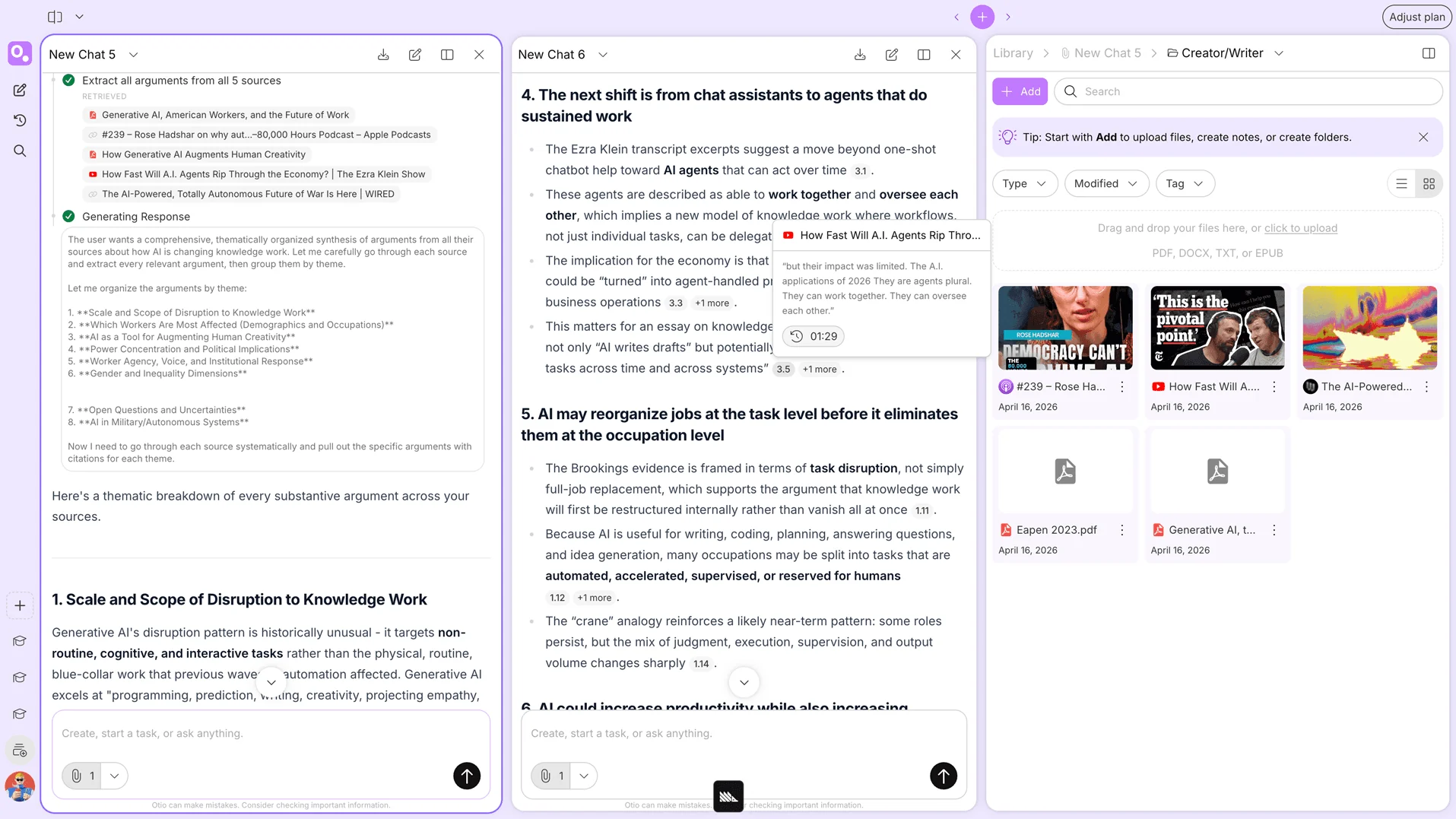
In short
Otio is a YouTube video summarizer that turns a pasted URL into a structured summary and keeps the full video in your workspace. You can ask specific questions weeks later and get cited answers pointing to the exact moment in the transcript. A 2-hour talk becomes a summary in under 10 minutes, in 74 languages.
- 200,000+Professionals worldwide
- 2 hrs → 10 minLong videos summarised fast
- 74Languages supported
The problem
Here's what happens after you get the summary
The paragraph is useful for five minutes. Three weeks later you can't find that specific insight from the 2-hour talk because the summary didn't save.
Summary useful for 5 minutes, then gone
Paste a YouTube URL into a free summarizer. Get a paragraph. Close the tab.
MoreLess
Three weeks later you can't find that specific insight from the 2-hour talk. The summary didn't save. You're back to scrubbing through the full video manually.
Generic summaries don't answer your questions
A pre-generated overview tells you what an algorithm decided was important, not what you actually need to know.
MoreLess
If the speaker gave three examples for a concept and you need the second one, the summary won't help.
The video doesn't connect to anything else
The talk references a paper. The paper cites a dataset. The dataset links to a report.
MoreLess
No YouTube summarizer connects these sources so you can ask one question across all of them at once.
You're stacking tools because none does it all
One tool for video. Another for PDFs. A third for podcasts.
MoreLess
ChatGPT for follow-ups that forget your sources an hour later. Switching costs you 6 hours per week and $60-80/mo in stacked subscriptions.
What makes Otio different from every other YouTube video summarizer
Permanent storage. Cross-source queries. Every AI model. 74 languages. Cited answers you can verify in one click.
Permanent video library
When Otio processes a YouTube video, it stores the source in your workspace permanently. Come back weeks later.
MoreLess
Ask a specific question. Get cited answers pointing to the exact moment in the transcript.
Cross-source: video + PDFs + podcasts
The talk references a paper. Add it. The paper cites a report. Add that too.
MoreLess
Ask one question across all three and get a cited answer pulling from each source.
Every AI model, no restrictions
Choose ChatGPT, Claude, Gemini, or Perplexity. Switch mid-session to compare how different models interpret the same video.
MoreLess
Every model, every tier, no hidden limits.
74 languages for international research
Summarise and query YouTube videos in any of 74 languages. English, Spanish, Mandarin, Arabic - Otio handles transcription and summarisation accurately.
How it works
Three steps: summarize, store, ask any time
Paste any YouTube URL. Get a structured summary. Ask follow-up questions today, next week, or three months later. Every answer cites the exact moment in the transcript.
- 1
Paste any YouTube URL
Conference talks, expert interviews, webinars, course recordings, podcasts.
MoreLess
Long videos are no problem — a 2-hour talk becomes a structured summary in under 10 minutes. Pick the AI model: ChatGPT, Claude, Gemini, Perplexity.
- 2
Video stays in your library permanently
Otio stores the full source, not just the summary. Come back in three weeks. The video is still there.
MoreLess
No other YouTube summarizer treats video as a permanent, queryable source you can keep using across sessions.
- 3
Ask targeted questions any time
What did the speaker recommend for X? What examples did they give for Y?
MoreLess
How does their argument compare to the paper you uploaded last month? Every answer cites the exact moment in the transcript.
Who it's for
Who uses Otio to summarize YouTube videos
Researchers, students, consultants, journalists, analysts. Anyone whose YouTube queue piles up faster than they can watch.
Researchers
Upload 2-hour conference talks, keynotes, recorded webinars. Get key takeaways in under 10 minutes.
MoreLess
Ask follow-ups weeks later with cited answers pointing to the exact moment. Combine with the papers they reference.
Students
Summarise lectures, course videos, educational content. Ask specific questions about concepts you didn't understand.
MoreLess
Cited answers point to the exact section. Store everything alongside readings.
Consultants
Upload client interviews, industry webinars, expert panels. Pull key points and themes across multiple videos.
MoreLess
Build deliverables on a structured summary. Combine video with meeting transcripts and reports.
Journalists
Upload 50+ sources - videos, podcasts, articles, transcripts. Pull arguments across everything, grouped by theme.
MoreLess
The speaker contradicted themselves between a podcast and a talk? Otio surfaces both with citations.
Analysts
Upload webinars, market analysis videos, research reports. Extract specific figures without watching every minute.
MoreLess
Ask Otio to pull key data points and trends. Every answer cited so you can verify the numbers.
See yourself in any of these?
Try Otio free. Unlimited videos, every AI model, cited answers. No credit card.
Start freeHow it compares
Honestly stacked against every other YouTube summarizer
Eightify, Glasp, NoteGPT, Decopy, YouLearn, ChatGPT, NotebookLM - they all do something well. Here's what they don't do.
Fast, free, and forgotten
Paste a URL, get a summary. Fast, free, perfect for casual viewing.
MoreLess
But the summary doesn't save and you can't ask follow-up questions. Fine if you'll never revisit. Otio is for when video is part of a research project.
Strong for single videos, no persistent workspace
Eightify has timestamps and 40+ languages. Glasp has 2M+ users and transcript highlighting.
MoreLess
Both are genuinely strong for single-video use. Neither stores video in a permanent library or lets you query across sources.
No persistent storage, locked model choice
ChatGPT forgets your sources an hour later. NotebookLM ingests YouTube but locks you to Gemini and caps you at 50 sources.
MoreLess
Otio: unlimited sources, every model (ChatGPT, Claude, Gemini, Perplexity), permanent library.
In their words
What our users say
As a master's student, @otio has been a game-changer for my thesis work. It's like having a personal research assistant available 24/7! Chatting with research articles and whole folders of content has saved me countless hours of reading and digging through papers.
Masters Student
@otio is really an excellent tool for understanding my papers. It is just like my personal librarian for the internet!
Neuroscience PhD
I took a 2 hour YouTube video and had the AI in Otio summarise it. I then asked follow-up questions about the highlighted pieces that got my attention. All told, I was able to collect key takeaways in less than 10 mins. Amazing.
Researcher
I was fed up fighting with ChatGPT every time I wanted to do a deep dive on a library of research papers I had collected. It's the small things that made me switch - can't recommend it enough.
Policy Analyst
I've been using Otio for a while now and I must say how much I like it! It’s incredibly helpful for summarizing key takeaways from research papers and long videos or podcasts, knowing from the start if the research is what I’m looking for and then allowing me to revisit important points precisely when I need them.
Economist
Truly loved interface: it’s very straight forward and intuitive vs other ai's. Especially vs having 100 tabs open and copy & pasting back and forth from ChatGPT
Pharmaceutical Researcher
Questions
Frequently asked questions about Otio's YouTube summarizer
Can Otio summarize long YouTube videos?
Yes. Otio handles long-form video accurately, including 2-hour conference talks, webinars, and course recordings. A user confirmed: "I took a 2 hour YouTube video and had the AI in Otio summarise it. I then asked follow-up questions about the highlighted pieces that got my attention. All told, I was able to collect key takeaways in less than 10 mins." You can choose which AI model processes the video: ChatGPT, Claude, Gemini, or Perplexity.
Does Otio store the video summary for later use?
Yes. When Otio processes a YouTube video, it stores the full source in your workspace permanently, not just the summary. You can return weeks later, ask a specific question, and get a cited answer pointing to the exact moment in the transcript. Most summarizers process the video and forget it. Otio treats video as a permanent, queryable source you can keep using across sessions.
Can I ask specific questions about a YouTube video after summarizing it?
Yes. You can chat with the video at any time after summarizing it. Ask what the speaker recommended, what examples they gave, or how their argument compares to a paper you uploaded. Every answer cites the exact source so you can verify it in one click. Generic summaries do not answer follow-up questions. Otio extracts what you actually need to know, not what an algorithm decided was important.
Does Otio work with non-English YouTube videos?
Yes. Otio supports 74 languages, so you can summarize and query YouTube videos in any language. Whether the video is in English, Spanish, Mandarin, or Arabic, Otio handles transcription and summarization accurately. Researchers working with international content can process sources without switching tools.
Can I combine YouTube videos with PDFs and other research sources in the same session?
Yes. You can add a conference talk, the paper it references, and a podcast with the same researcher to one Otio session and ask questions across all of them simultaneously. Every answer pulls from the relevant source and cites it. You can upload PDFs, articles, videos, and podcasts, or connect Google Drive, Zotero, Mendeley, Dropbox, OneDrive, and Box.
How accurate are Otio's summaries for technical content?
Otio generates answers only from the material you have uploaded and cites every claim back to the exact source. There are no hallucinated references, no invented authors, and no timestamps that do not match. You can choose the AI model best suited to your domain and switch between ChatGPT, Claude, Gemini, and Perplexity to compare interpretations.
Do I need to create an account to try Otio's YouTube video summarizer?
No. You can paste a YouTube URL and see how Otio works before creating an account. No credit card, no commitment, no friction. A 7-day free trial gives you full access to every feature: unlimited sources, every AI model, cross-source querying, and permanent storage.
What types of YouTube videos can Otio summarize?
Otio handles any YouTube video: conference talks, expert interviews, webinars, course recordings, podcasts, lectures, panel discussions, and educational content. Long-form or short-form, technical or general, the workflow is the same. Paste the URL, get a summary, ask follow-up questions, and combine the video with your other research sources in the same workspace.
Keep exploring
AI PDF reader
Ask across a whole library of PDFs. Every answer points to the page it came from.
OpenMultiple AI models
ChatGPT, Claude, Gemini and more in one workspace. Put two answers side by side.
OpenAI book summarizer
Upload a book, ask about any chapter and get answers tied to the page.
OpenPricing
Free, Go and Pro, with what each plan includes.
OpenTurn YouTube videos into permanent research sources
7 days free. Every AI model. Cited answers. Every video you summarise, stored permanently.
Start free