AI Book Summarizer That Reads Your Actual Text
Upload a book, ask about any chapter and get answers tied to the page.
In short
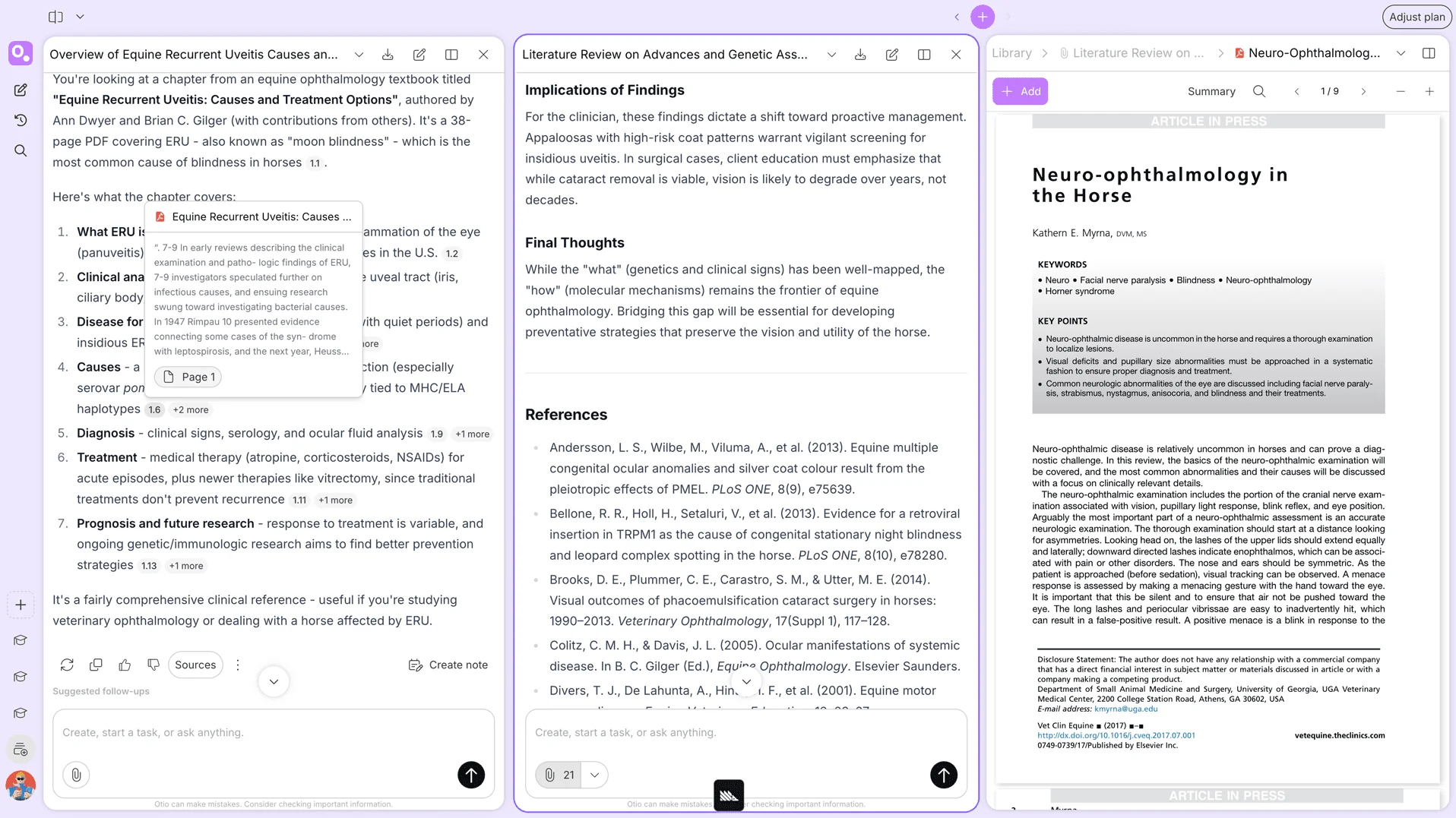
Otio is an AI book summarizer that reads the PDF or ePub you upload and answers from the exact pages you need, not from training data. You can ask targeted questions about chapters and concepts, get cited answers with page references, and keep the book in your workspace to query it alongside your other research sources.
- 200,000+Professionals
- 74Languages
- 6 hoursPer week lost to stacked AI tools
The problem
Why Most Book Summarizers Miss What You Actually Need
They Summarize the Book's Reputation, Not Your Copy
Title-based summarizers generate from what the internet says about a book, not the actual text you're studying.
MoreLess
If you're working from a specific edition, a translated version, or a textbook with unique supplementary material, those tools can't help. Otio reads the file you upload. Every answer comes from your actual text, not a training-data approximation.
No Way to Connect the Book to Your Other Sources
Students and researchers need to connect a textbook's arguments to the papers it cites, or a novel to the critical essays about it.
MoreLess
No ai book summarizer on the SERP makes this possible. Otio stores the book alongside your other research materials in one workspace. Ask questions across all of them and get answers that connect the arguments.
A Static Summary Doesn't Answer Your Next Question
Most tools give you a summary and close the loop. When you need to find where the author addresses a specific concept in chapter 7, or how their argument in part two resolves a tension from part one, a static summary can't help.
MoreLess
Otio lets you ask targeted questions about specific sections and returns cited answers with page references. The summary is the starting point, not the endpoint.
The Book Disappears After One Session
Upload-based tools process your book and discard it. If you need to come back next week with a new question, you start over.
MoreLess
Otio keeps the book in your workspace permanently. Upload it once, query it indefinitely.
The problem
Here's What the Old Way Actually Costs You
Time, money, and trust. The cost of stitching multiple AI tools together to do what one workspace should.
- 6 hours per week: Copy-pasting source text into ChatGPT that forgets it an hour later. Stacking ChatGPT, Claude, Gemini, and Perplexity because none does it all. Time spent on reading you should have done Tuesday.
- $60-80 per month: Paying for multiple AI subscriptions because no single tool handles your research workflow. ChatGPT for one task, Claude for another, Gemini for a third. Otio gives you every AI model in one workspace. One subscription, every tool, no tab-switching.
- Hallucinated References From ChatGPT: Invented authors, fake journals, page numbers that do not match. ChatGPT generates answers without citing the exact source, leaving you to verify everything manually. Otio cites every answer back to the exact page. Click the citation to jump to the passage in your source text.
How it works
Upload Once. Query Forever. Every Answer Cited.
- 1
Upload Your Book in PDF or ePub Format
Drag your textbook, monograph, policy manual, or legal code into Otio.
MoreLess
The tool accepts PDF and ePub files, covering the two most common digital book formats. The book stays in your workspace permanently. No session limits, no expiration, no need to re-upload.
- 2
Ask Targeted Questions About Specific Sections
Get an overview of the book fast, then keep asking. ' Otio returns cited answers with page references.
MoreLess
Click the citation to jump to the exact passage in the source text.
- 3
Cross-Reference With Your Other Research Materials
Add the papers the book cites, the lecture notes from your course, or the critical essays about the novel.
MoreLess
Ask questions across all of them in the same session. Otio pulls arguments and evidence from multiple sources simultaneously, showing you how the book's claims connect to the broader research landscape.
- 4
Choose Your AI Model for Every Query
Switch between ChatGPT, Claude, Gemini, and other models depending on the task.
MoreLess
One workspace, every AI model, no need to copy-paste between tabs. Your train of thought stays on the rails. The book and your sources stay in one place.
The Only AI Book Summarizer Built for Serious Research
Five ways Otio differs from generic book summarizers built for casual readers.
It Reads Your Uploaded File, Not Training Data
Title-based summarizers generate from what the internet says about a book.
MoreLess
Otio reads the PDF or ePub you upload and answers from the actual text. If you are working from a specific edition, a translated version, or a textbook with unique supplementary material, Otio works from your copy, not a generic description.
The Book Stays in Your Workspace Permanently
Most tools process your book and discard it. Otio stores the book in your workspace so you can come back during finals, during your dissertation chapter, or when you are writing a policy brief six months later.
MoreLess
Upload once, query indefinitely. No session limits, no expiration.
Ask Specific Questions, Get Cited Answers
Static summaries cannot tell you what the author says about a specific concept in chapter 7.
MoreLess
Otio's chat mechanic lets you ask targeted questions and returns answers with page references. Click the citation to jump to the exact passage. Verify everything before you use it.
Query the Book Alongside Your Other Sources
The textbook and the papers it cites. The novel and the critical essays about it.
MoreLess
Ask one question across all of them and get answers that connect the arguments. No other AI book summarizer makes this possible. Otio treats your book as part of a broader research library, not an isolated document.
Every AI Model in One Workspace
Switch between ChatGPT, Claude, Gemini, and other models depending on the task.
MoreLess
No need to copy-paste between tabs or lose your train of thought. One workspace, every AI model, every answer cited. Your research stays organized.
Who it's for
Built for Students, Researchers, and Professionals Who Work With Dense Texts
Based on Otio's onboarding data from the past 90 days, 1,019 of 1,750 users (58%) select 'Summarise & read papers' as a primary use case, the second most-popular reason people sign up, alongside 'Analyse PDFs & documents'.
Graduate Students and PhD Candidates
Upload your assigned textbooks, monographs, and theoretical works.
MoreLess
Ask questions about specific arguments, find where the author addresses particular topics, and connect the book's claims to the papers you're reading for your literature review. Master's student Laurin S. says: 'As a master's student, Otio has been a game-changer for my thesis work. It's like having a personal research assistant available 24/7. '
Consultants and Policy Analysts
Upload client briefs, policy reports, technical handbooks, and market analysis.
MoreLess
Extract specific figures without reading every page yourself. Get a structured summary you can build your deliverable on, in a fraction of the time. Sunday night prep becomes manageable. Thirty client docs become one queryable workspace.
Lawyers and Legal Researchers
Upload case files, legal codes, policy manuals, and compliance documents.
MoreLess
Ask Otio to pull key facts, themes, and contradictions across documents. Every answer is traced back to the exact source so you can verify everything before it leaves your desk. Billable hours stay billable. Discovery piles become queryable libraries.
Researchers Across Disciplines
Neuroscience PhD candidates, pharmaceutical researchers, and post-doc researchers use Otio to summarize key takeaways from research papers and long videos.
MoreLess
The tool is trusted by over 200,000 professionals across 74 languages. One neuroscience PhD user says: 'Otio is really an excellent tool for understanding my papers. '
From Quick Overviews to Deep Cross-Source Analysis
Six capabilities, from a structured overview of a single book to cross-source querying across your full research library.
-
Get a Structured Overview of the Entire Book
Upload your textbook or monograph and ask Otio to summarize the key arguments, themes, and structure.
MoreLess
The summary gives you a structured starting point so you know what the book covers before you dive into specific sections. Start from a synthesis, not a blank page. The overview is the entry point, not the endpoint.
-
Ask About Specific Chapters or Sections
" Otio returns cited answers with page references so you can verify the claim yourself.
MoreLess
Targeted questions get targeted answers. No need to read 400 pages sequentially to find one argument.
-
Find Where the Author Addresses a Particular Concept
Ask Otio to pull every mention of a specific concept, theory, or term across the entire book.
MoreLess
The tool shows you where the author introduces the idea, develops it, and revisits it in later chapters. Trace the argument's evolution without manually scanning every page.
-
Connect the Book's Arguments to Your Other Sources
Add the papers the book cites, the lecture notes from your course, or the critical essays about the novel.
MoreLess
Ask questions across all of them and get answers that connect the arguments. The textbook and the papers it references. The novel and the critical essays about it. One question, multiple sources, cited answers.
-
Export Key Findings and Quotes for Your Writing
Pull key findings and quotes across the book and your other sources.
MoreLess
Export them to your writing tool or citation manager. Every answer includes the page reference so you can cite it correctly. Build your literature review, policy brief, or case analysis from a structured synthesis, not a swamp of tabs and half-read bookmarks.
-
Come Back Anytime With New Questions
Upload the book today, ask questions during finals, and return to it when you are writing your dissertation chapter.
MoreLess
The book stays in your workspace permanently, still answering questions, still producing cited page references. Permanent storage means you build a research library, not a collection of expired summaries.
How it compares
Why Researchers Choose Otio Over ChatGPT for Book Analysis
ChatGPT is built for general conversation. Otio is built for serious book-based research. Five reasons that matters.
ChatGPT Does Not Store Your Book Between Sessions
Upload a book to ChatGPT and it is gone an hour later. If you need to come back next week with a new question, you start over.
MoreLess
Otio stores the book in your workspace permanently. Upload once, query indefinitely.
ChatGPT Has File Size Limits That Exclude Full-Length Books
ChatGPT's file upload limits make it impractical for full-length textbooks or monographs.
MoreLess
Large PDFs get rejected or truncated. Otio handles full-length books in PDF and ePub format without file size restrictions.
ChatGPT Generates From Training Data for Well-Known Titles
Ask ChatGPT about a well-known book and it generates from what the internet says about it, not the actual text you are studying.
MoreLess
If you are working from a specific edition or a translated version, ChatGPT cannot help. Otio reads the file you upload and answers from the actual text. Every answer is grounded in your copy, not training-data generalizations.
ChatGPT Does Not Cite Page References
ChatGPT generates answers without page-level citations. If you need to verify a claim or cite it in your writing, you are on your own.
MoreLess
Otio returns every answer with a page reference. Click the citation to jump to the exact passage in the source text.
Otio Lets You Query the Book Alongside Your Other Sources
ChatGPT processes one document at a time. If you need to connect the book's arguments to the papers it cites, you copy-paste between tabs and lose your train of thought.
MoreLess
Otio stores the book alongside your other research materials in one workspace. Ask questions across all of them and get answers that connect the arguments.
Works With PDF, ePub, and Your Existing Research Tools
Upload Books in PDF or ePub Format
Connect Google Drive, Dropbox, OneDrive, or Box. Your research materials sync directly into Otio, no manual uploads required.
MoreLess
The CSV, the charts, and the documents that give them context all live in one workspace, whether you upload them directly or pull them from cloud storage.
Connect Your Research Library
Connect Zotero or Mendeley. Your research library syncs into Otio so you can generate charts from your data and ask questions across your papers in the same session.
MoreLess
No exporting, no copy-paste. Your reference manager and your visualization workspace work together.
Add Articles, Videos, and Podcasts Alongside Your Books
PDFs, articles, videos, podcasts, transcripts, and CSV files.
MoreLess
Otio handles the formats researchers actually use, not just the ones BI tools expect. Upload your materials however they exist. Otio turns them into a structured starting point for chart generation and cross-source questioning.
Export Findings to Your Writing Tool
Pull key findings and quotes from your books and other sources.
MoreLess
Export them to your writing tool or citation manager with page references intact. Build your literature review, policy brief, or case analysis from a structured synthesis, not a blank page.
What to do next
-
Try Otio free
Create your first workspace and chat across your sources
-
Upgrade to Otio Go - $7/mo
Unlimited sources, all AI models, citations to exact page
In their words
What people say
As a master's student, Otio has been a game-changer for my thesis work. It's like having a personal research assistant available 24/7. Chatting with research articles and whole folders of content has saved me countless hours of reading and digging through papers.
Master's student
Otio is really an excellent tool for understanding my papers. It is just like my personal librarian for the internet.
This is the exact tool I've been looking for. I've gathered an overwhelming collection of over 700 bookmarks and 190 open web browser tabs. These resources are my roadmap to research, but navigating through them has become increasingly challenging. This has been the beacon I need in this sea of information.
Founder
I don't know how you do it but the gap in summary and answer quality to ChatGPT is big. And having real text citations is a game changer.
The workflow was much more user-friendly than trying to accomplish the same thing in Bard.
Questions
Common Questions About Otio's AI Book Summarizer
Does Otio Read My Uploaded Book or Generate From Its Training Data?
Otio reads the PDF or ePub file you upload and generates answers only from the actual text. It does not generate from training data or pre-existing knowledge about the book. If you're working from a specific edition, a translated version, or a textbook with unique supplementary material, Otio works from your copy, not a generic description. Every answer is grounded in the text you uploaded, and every claim is cited back to the exact page.
What Book Formats Does Otio Support?
Otio accepts PDF and ePub files, covering the two most common digital book formats. Textbooks, monographs, policy manuals, legal codes, and technical handbooks all work. Drag your file into Otio or connect your cloud storage (Google Drive, Dropbox, OneDrive, Box) to import books directly. The tool also handles articles, YouTube videos, and podcast transcripts, so you can add multiple source types to the same workspace.
Can I Ask Questions About Specific Chapters or Sections?
Yes. Otio's chat mechanic lets you ask targeted questions about specific sections, arguments, and concepts. 'What does the author say about X in chapter 3?' 'How does their argument in part two resolve the tension introduced in part one?' Otio returns cited answers with page references. Click the citation to jump to the exact passage in the source text. The summary is the starting point, not the endpoint.
Does Otio Store the Book After I Upload It?
Yes. The book stays in your workspace permanently. Upload it today, ask questions during finals, and return to it when you're writing your dissertation chapter. No session limits, no expiration, no need to re-upload. Permanent storage means you build a research library, not a collection of expired summaries.
Can I Analyze the Book Alongside Other Research Materials?
Yes. Otio stores the book alongside your other research materials in one workspace. Add the papers the book cites, the lecture notes from your course, or the critical essays about the novel. Ask questions across all of them in the same session and get answers that connect the arguments. The textbook and the papers it references. The novel and the critical essays about it. One question, multiple sources, cited answers.
How Is Otio Different From ChatGPT for Book Summarization?
ChatGPT doesn't store your book between sessions, has file size limits that exclude full-length books, and generates from training data for well-known titles rather than the actual text you uploaded. Otio stores the book permanently, handles full-length books in PDF and ePub format, reads the actual uploaded file, and returns every answer with a page reference. For a specific book you're using as a primary research source, Otio is built for that use case.
Will Otio Work on Dense Academic Books, Not Just Popular Nonfiction?
Yes. Otio was built for students and researchers who work with dense, specialized texts like textbooks, monographs, theoretical works, policy manuals, and legal codes. The chat-with-source mechanic means you extract what you need, not what an algorithm decided to summarize. Ask about a specific argument, a specific chapter, a specific claim. Get a cited answer with the page number.
Can I Trust Otio to Give Me Accurate Information?
Otio is designed to work with your sources, not around them. It generates answers only from the material you've uploaded, cites every claim back to the exact source, and tells you when something isn't there, rather than inventing an answer to fill the gap. Every answer includes a page reference. Click the citation to verify the claim yourself before you use it in your writing.
Keep exploring
AI PDF reader
Ask across a whole library of PDFs. Every answer points to the page it came from.
OpenMultiple AI models
ChatGPT, Claude, Gemini and more in one workspace. Put two answers side by side.
OpenYouTube video summarizer
Paste a link, get a summary with timestamps, and keep the video as a source you can question.
OpenPricing
Free, Go and Pro, with what each plan includes.
Open