Analyse discovery files, depositions, and case materials
Discovery files, depositions and judgments, with a paragraph reference for every claim.
In short
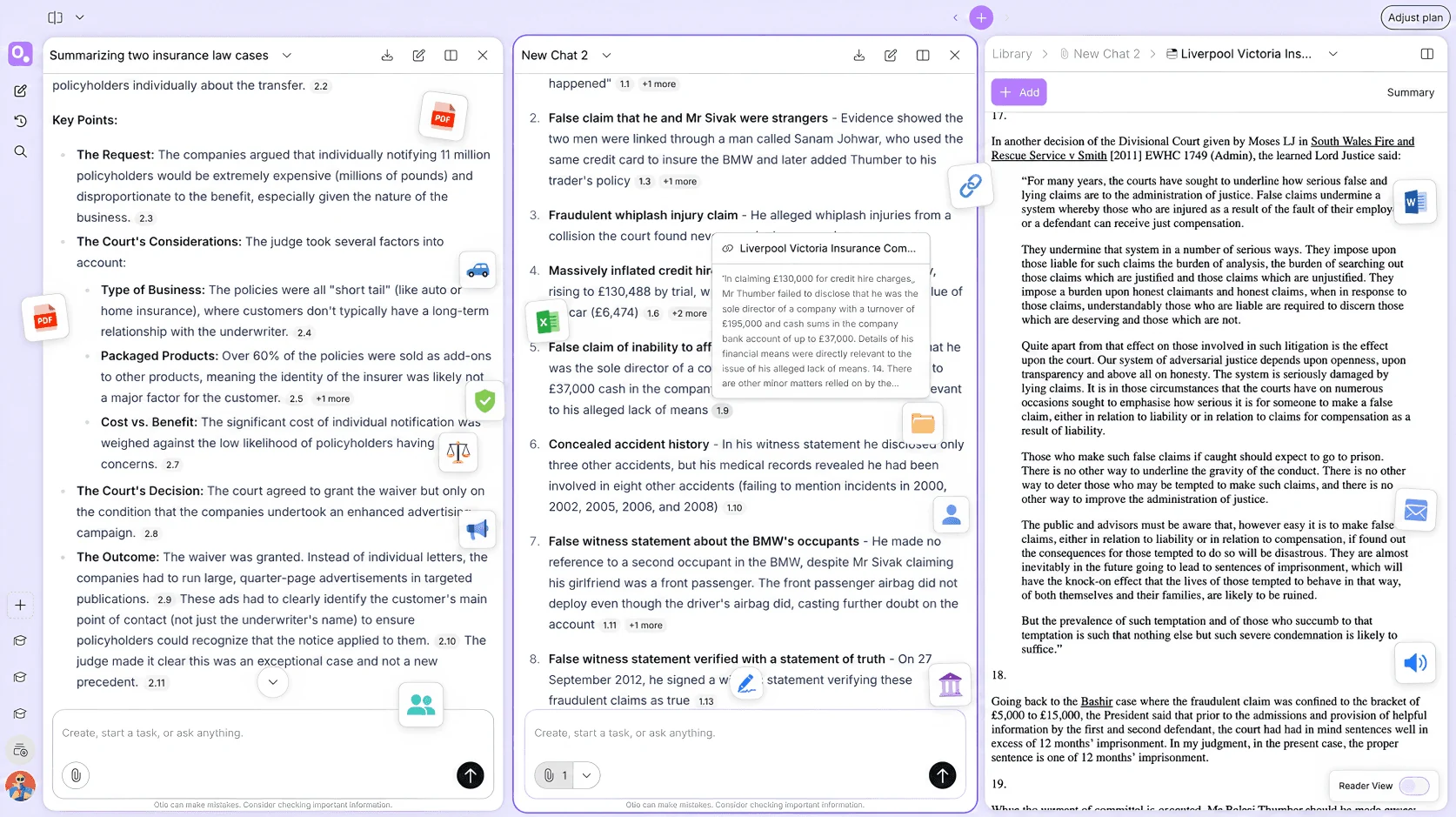
Otio is an AI research workspace that lets legal teams analyse the discovery files, depositions and case materials they already have, rather than searching a legal database. Upload the documents, ask questions across the whole pile, such as what contradicts what, and get answers cited to the exact document, page and line. Otio surfaces the sources; legal judgment and verification stay with you.
- 200,000+Professionals worldwide
- 11% → 30%ABA lawyer AI adoption (2023-24)
- UnlimitedDiscovery files per matter
The problem
What manual discovery review actually costs you
Weeks of reading. Billable hours lost to document hunting. No audit trail. Scanned PDFs that can't even be searched.
Weeks spent reading what you could search
A 150-document discovery pile means 150 separate reading sessions to find every mention of a key fact.
MoreLess
Manual extraction is slow, error-prone, and impossible to cross-reference at scale.
Billable hours lost to document hunting
Searching for contradictions across depositions means re-reading each transcript multiple times, manually tracking references.
MoreLess
Junior associates and paralegals spend entire days on tasks that don't require legal judgment.
No way to verify what you might have missed
Manual review leaves you wondering whether you caught every relevant passage.
MoreLess
No audit trail, no systematic search log, no confidence that the extraction is complete. Professional risk isn't just time - it's the uncertainty.
Scanned PDFs that can't be searched
Older discovery materials arrive as image-based PDFs with no searchable text layer.
MoreLess
Standard tools can't read them - you're back to manual page-by-page review. Legacy case files become inaccessible black boxes.
Who it's for
Built for the work legal database tools don't handle
Cross-document contradiction detection. Multi-jurisdiction surveys. Deposition analysis at page-and-line precision. Discovery review at scale.
Cross-document contradiction detection
Ask where depositions contradict each other. Get cited answers surfacing conflicts across the entire pile.
MoreLess
Otio shows you the contradictions — the legal judgment stays with you.
Multi-jurisdiction research
Upload materials from all 50 states and query across them simultaneously.
MoreLess
First draft of the 50-state survey in a fraction of the time, every claim cited back to source.
Deposition and transcript analysis
Summarise key testimony, extract specific facts, cite to page and line.
MoreLess
Pull related passages and verify every reference before you use it. Page-and-line precision built in.
Scanned PDF + legacy docs (Datalab OCR)
Image-based PDFs get OCR processing through Datalab. Older case materials become searchable and citeable just like native PDFs. Legacy files integrate automatically.
How it works
The discovery pile, searchable and cited to page and line
Upload your case materials. Ask across the entire pile. Verify every citation before it leaves your desk.
- 1
Upload unlimited case materials
Discovery responses, depositions, expert reports, correspondence. Upload 100, 150, 200 files.
MoreLess
Scanned PDFs get OCR via Datalab so legacy materials become searchable.
- 2
Ask questions across the entire pile
One query searches every uploaded document simultaneously. Ask what the depositions say, where expert reports contradict, which documents support a specific claim. Days of reading become minutes.
- 3
Verify every citation before you use it
Every answer cites the document name, page number, and direct passage. Click any citation to jump to the source.
MoreLess
Nothing leaves your desk without your review. Legal judgment stays with you.
How it compares
How Otio compares to Westlaw, Harvey, ChatGPT, and NotebookLM
Otio doesn't replace your legal database. It handles the discovery pile that database tools weren't designed for.
legal database search
Built for case law research, statutory analysis, brief drafting from legal databases.
MoreLess
Strong for searching external legal content you don't bring. Otio is for the documents you already have — discovery, depositions, client materials. Different tools, different jobs.
general AI, no persistence, no verification
Useful for drafting but no persistent document storage, file upload caps, known citation hallucination.
MoreLess
Legal professionals can't use AI outputs they can't verify. Otio stores your documents permanently and cites every answer to the exact source.
source-grounded but file-capped at 50
Strong source-grounded analysis, but 50-source cap is a real constraint for discovery-heavy matters.
MoreLess
Large case files exceed the limit quickly. Otio handles unlimited documents with the same citation precision — 100, 150, 200 files in one matter.
Your case materials stay confidential and verifiable
Discovery files, depositions, client materials. Otio works with your sources, not around them. Source-grounded answers, page-and-line citations, no model training on your documents. Professional responsibility stays with you.
Source-grounded, no hallucinations
Answers only from your uploaded materials. Tells you when something isn't there rather than inventing case citations or page numbers.
Your documents, your control
Case materials stay in your workspace. Not used to train models. Not shared with third parties.
MoreLess
You control what gets uploaded and when documents are removed.
Every output verifiable before it leaves your desk
Click any citation to jump to the source passage. Review the original context.
MoreLess
Make the professional judgment about whether to use it. Nothing gets signed without your review.
Research assistant, not legal advisor
Otio doesn't generate legal advice, conclusions, or court-ready outputs.
MoreLess
It searches, extracts, synthesises from your uploaded materials. Legal analysis stays with you.
In their words
What people say
As a master's student, @otio has been a game-changer for my thesis work. It's like having a personal research assistant available 24/7! Chatting with research articles and whole folders of content has saved me countless hours of reading and digging through papers.
Masters Student
@otio is really an excellent tool for understanding my papers. It is just like my personal librarian for the internet!
Neuroscience PhD
I took a 2 hour YouTube video and had the AI in Otio summarise it. I then asked follow-up questions about the highlighted pieces that got my attention. All told, I was able to collect key takeaways in less than 10 mins. Amazing.
Researcher
I was fed up fighting with ChatGPT every time I wanted to do a deep dive on a library of research papers I had collected. It's the small things that made me switch - can't recommend it enough.
Policy Analyst
I've been using Otio for a while now and I must say how much I like it! It’s incredibly helpful for summarizing key takeaways from research papers and long videos or podcasts, knowing from the start if the research is what I’m looking for and then allowing me to revisit important points precisely when I need them.
Economist
Truly loved interface: it’s very straight forward and intuitive vs other ai's. Especially vs having 100 tabs open and copy & pasting back and forth from ChatGPT
Pharmaceutical Researcher
Questions
Frequently asked
Is Otio a legal research database like Westlaw or LexisNexis?
No. Westlaw and LexisNexis are built for case law and statutory research from legal databases. Otio analyzes the lawyer's own uploaded documents: discovery files, depositions, client correspondence, case materials. Different tools for different jobs. Use Westlaw for case law research, use Otio for analyzing the discovery pile and case materials that result from that research.
Can Otio handle scanned or image-based discovery PDFs?
Yes. Scanned PDFs get OCR processing through Datalab, which converts image-based documents into searchable, citeable text. Older discovery materials that arrive without a text layer become fully searchable. Legacy case files that used to require manual page-by-page review now integrate into your searchable document library automatically.
How does Otio cite its answers from legal documents?
Every Otio answer includes the document name, page number, and direct passage that supports the claim. Click any citation to jump straight to the source material in context. The citation standard is page-and-line precision, the same standard legal professionals require for professional work. You verify every reference before you use it.
How many documents can I upload for a single matter?
Unlimited. Upload 100, 150, 200 discovery files and the entire pile stays searchable throughout the matter. No file caps, no per-document fees, no artificial limits. Discovery-heavy matters with large document volumes are exactly what Otio is built to handle. The workspace scales with your case.
Can Otio identify contradictions across multiple documents?
Yes. Ask where depositions contradict each other and get cited answers that surface conflicts across the entire pile. One query searches all uploaded documents simultaneously. Otio shows you where the contradictions are with citations to each source. The legal judgment about what the contradictions mean for your case stays with you.
What if Otio misses something in the discovery pile?
Otio's retrieval works from what you've uploaded. For comprehensive discovery review, it dramatically reduces manual reading time, but the lawyer still owns the completeness judgment. The tool accelerates systematic extraction and cross-document search. The professional responsibility for thoroughness and completeness stays with you.
Does Otio generate legal advice or court-ready outputs?
No. Otio provides structured starting points: facts organized, documents searched, contradictions surfaced. It does not generate legal conclusions, strategic advice, or court-ready work product. As one lawyer put it: "I give it work I would give a summer associate." The legal analysis, judgment, and professional responsibility stay with you.
How does Otio handle attorney-client privilege and confidentiality?
Your case materials stay in your workspace. Otio does not train AI models on your uploaded documents. You control what gets uploaded, who has access, and when documents are removed. Discovery files, depositions, and client materials remain confidential. The workspace is yours, the documents are yours, the control is yours.
Keep exploring
AI OCR for PDFs
Scanned and photographed pages become text you can search and question.
OpenAI PDF reader
Ask across a whole library of PDFs. Every answer points to the page it came from.
OpenFinancial analysis
Earnings calls, filings and due diligence. Exact quotes with the speaker and the page.
OpenMultiple AI models
ChatGPT, Claude, Gemini and more in one workspace. Put two answers side by side.
OpenTurn the discovery pile into a searchable library
Unlimited discovery files. Page-and-line citations. Every AI model. No credit card.
Start free