AI OCR PDF: scanned documents become research sources
Scanned and photographed pages become text you can search and question.
In short
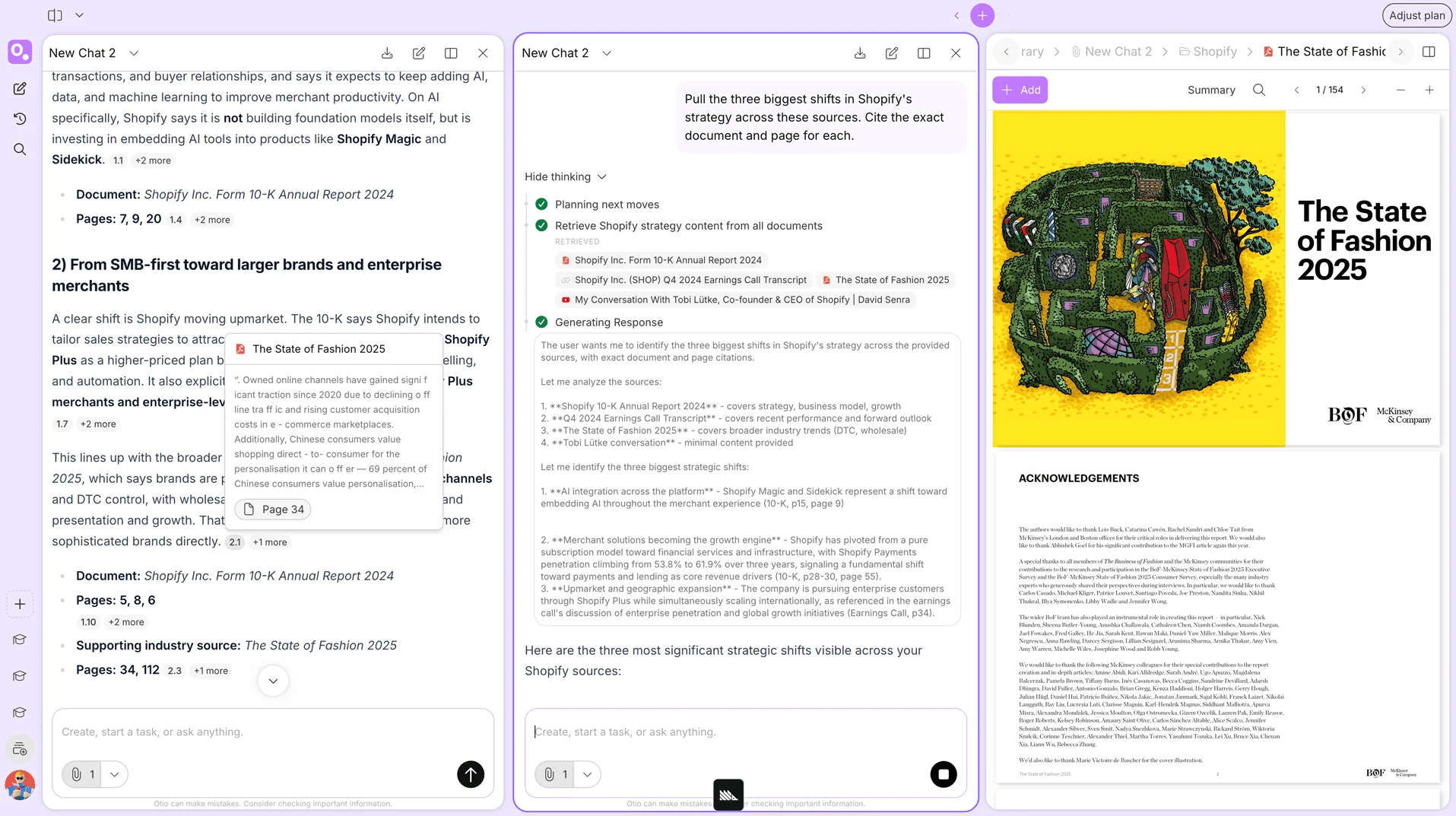
Otio is a research workspace that runs scanned and image-based PDFs through a dedicated OCR service, so they become readable, queryable sources instead of text files. You can upload one scan or hundreds in a batch, ask questions across them and your other documents, and get answers cited to the exact page and passage.
- 200,000+Professionals worldwide
- 100sOf files, batched at once
The problem
Why most OCR tools leave you stuck
Extraction-only tools hand you back a text file and stop. The scanned PDF doesn't live anywhere useful. The workflow breaks the moment OCR finishes.
Extraction ends, manual work begins
Adobe Acrobat and ABBYY FineReader extract text with high accuracy, then hand you back the file and stop.
MoreLess
Copy into ChatGPT. Paste into a note app. Start over for the next document. The extraction solved one problem and created three more.
AI tools fail on scanned documents
ChatGPT, Claude, Gemini cannot read image-based PDFs without OCR preprocessing.
MoreLess
Upload a scanned discovery file or archival paper and the AI returns an error or a generic summary proving it never read the content.
No workspace, no workflow
Standard OCR tools don't offer a research workspace. The scanned doc gets converted but doesn't become a queryable library source you can interrogate alongside depositions, case files, or compliance docs.
The copy-paste loop never ends
Extract in one tool. Copy into ChatGPT. Realize you need another scanned doc. Extract that one. New ChatGPT session.
MoreLess
Lose your train of thought somewhere in the middle. The OCR tool and the AI tool don't talk to each other.
Scanned PDFs become research sources, not just text files
Dedicated OCR infrastructure, permanent workspace storage, cross-source queries across scanned and modern documents. The workflow connection extraction-only tools don't offer.
Dedicated OCR — not a fallback
Otio uses its own dedicated OCR system. Not a generic AI layer. Signals professional-grade infrastructure investment.
Permanent workspace storage
After OCR processing, the scanned doc stays in your workspace permanently.
MoreLess
Ask today, return next month, cross-reference with materials you upload later.
Cross-source: scanned + modern
Upload the 1990 case file (scanned) and the 2024 paper that cites it. Ask Otio to pull themes across both. Scanned docs treated as equals.
Cited to the exact page
Every answer about the scanned document cites the exact page and passage. Click to verify in one step. Legal-grade precision.
How it works
From scanned PDF to research source in three steps
No manual intervention per file. Upload, let Datalab do its job, query like any other source.
- 1
Upload your scanned PDFs
Drag and drop, or connect Google Drive, Zotero, Mendeley, Dropbox, OneDrive, Box. One document or a hundred - batch processing handles the volume.
- 2
Otio processes the OCR
Otio's dedicated OCR system converts scanned pages into readable text.
MoreLess
Automatic, in the background, no manual intervention per file. Purpose-built - not a fallback.
- 3
Query like any other source
The scanned document becomes a permanent workspace source. Ask questions, cross-reference with other materials, choose any AI model. Every answer cites the exact page.
Who it's for
Who needs AI OCR PDF capabilities
Legal discovery, archival research, compliance work, physical scan conversions. Anywhere scanned documents pile up.
Legal discovery and case files
Upload 100 scanned discovery PDFs - depositions, case files, compliance docs. Datalab processes them all.
MoreLess
Pull key facts, themes, contradictions across the batch. Every answer cites the source. Billable hours stay on analysis, not text extraction.
Archival research and historical documents
Academic work with older journal articles, institutional archives, historical documents.
MoreLess
Standard AI tools fail to read them. Otio processes the scan and the 1980 survey lives in the same workspace as the 2024 analysis that references it.
Compliance and regulatory files
Scanned regulatory filings, audit reports, legacy policy documents. Upload the entire pile.
MoreLess
Otio reads them all, then lets you query for specific clauses, policy changes, or audit findings. Permanent workspace sources, not one-time extractions.
Physical scan conversions
Meeting notes, handwritten reports, printed research papers — physical documents converted to PDF often lack text layers.
MoreLess
AI tools can't read them without OCR. Otio handles the processing via Datalab, then the scan becomes a research source like any other.
In their words
What our users say
As a master's student, @otio has been a game-changer for my thesis work. It's like having a personal research assistant available 24/7! Chatting with research articles and whole folders of content has saved me countless hours of reading and digging through papers.
Masters Student
@otio is really an excellent tool for understanding my papers. It is just like my personal librarian for the internet!
Neuroscience PhD
I took a 2 hour YouTube video and had the AI in Otio summarise it. I then asked follow-up questions about the highlighted pieces that got my attention. All told, I was able to collect key takeaways in less than 10 mins. Amazing.
Researcher
I was fed up fighting with ChatGPT every time I wanted to do a deep dive on a library of research papers I had collected. It's the small things that made me switch - can't recommend it enough.
Policy Analyst
I've been using Otio for a while now and I must say how much I like it! It’s incredibly helpful for summarizing key takeaways from research papers and long videos or podcasts, knowing from the start if the research is what I’m looking for and then allowing me to revisit important points precisely when I need them.
Economist
Truly loved interface: it’s very straight forward and intuitive vs other ai's. Especially vs having 100 tabs open and copy & pasting back and forth from ChatGPT
Pharmaceutical Researcher
Questions
Frequently asked questions about AI OCR PDF
Can Otio read scanned or image-based PDFs?
Yes. Otio uses a dedicated OCR service called Datalab to process scanned and image-based PDFs. This is not a fallback or a generic AI layer — it is a purpose-built service that converts scanned documents into fully readable, queryable research sources. Text-layer PDFs (modern documents with selectable text) do not need OCR processing. Scanned PDFs (image-based documents without text layers) are processed via Datalab automatically when you upload them.
What OCR service does Otio use?
Otio uses Datalab, a dedicated OCR service, to process scanned PDFs. Naming the service signals professional-grade infrastructure investment rather than a vague AI-powered OCR claim. Datalab handles the text extraction at scale, adding scanned documents to your workspace without manual intervention per file.
What happens to the scanned PDF after OCR processing?
After Datalab processes the scanned PDF, the document becomes a permanent workspace source in Otio. You can ask questions about it, cross-reference it with your other research materials, and return to it next week or next month. Most OCR tools extract the text and stop. Otio gives you a research source that lives in your library permanently, fully queryable and cross-referenceable with everything else you upload.
Can Otio handle poor-quality scans or complex layouts?
Datalab is designed to handle a wide range of scanned document quality, including older scans and complex layouts. OCR accuracy depends on the quality of the original scan: clearer scans produce better text extraction. If you are working with particularly poor-quality scans or complex multi-column layouts, test the OCR processing during the free trial to verify that the extraction meets your standards.
Can I process multiple scanned PDFs at once?
Yes. Otio supports batch processing for large volumes of scanned documents. Upload 100 discovery PDFs or 50 archival research papers, and Datalab processes them all automatically. Legal professionals, compliance teams, and researchers regularly work with large scanned document volumes. Otio handles the extraction at scale without manual intervention per file.
Does Otio handle handwritten documents?
Datalab's OCR service is optimized for printed text in scanned PDFs. Handwritten documents may produce less accurate text extraction depending on handwriting clarity and scan quality. If you are working with handwritten documents, test the OCR processing during the free trial to verify that the extraction meets your needs.
How does Otio compare to Adobe Acrobat or ABBYY FineReader for OCR?
Adobe Acrobat and ABBYY FineReader are dedicated OCR tools with high extraction accuracy and comprehensive PDF editing features. They extract the text from scanned PDFs and stop. Otio's differentiation is what happens after extraction: the scanned document becomes a permanent workspace source that is queryable, cross-referenceable, and fully integrated with your other research materials. Use Acrobat or FineReader if you need editing features; use Otio when you need to research the content.
Can I use Otio with my existing OCR tools?
Yes. If you already use Adobe Acrobat or ABBYY FineReader for OCR, you can continue using them for editing features and upload the processed documents to Otio for research workflows. Otio also processes scanned PDFs directly via Datalab, so you do not need a separate OCR tool if your focus is research rather than editing.
Keep exploring
AI PDF reader
Ask across a whole library of PDFs. Every answer points to the page it came from.
OpenMultiple AI models
ChatGPT, Claude, Gemini and more in one workspace. Put two answers side by side.
OpenAI book summarizer
Upload a book, ask about any chapter and get answers tied to the page.
OpenPricing
Free, Go and Pro, with what each plan includes.
OpenTurn your scanned pile into a queryable library today
Otio OCR included. Every AI model. Cited answers. No credit card.
Start free