AI PDF reader built for your entire library, not just one document
Ask across a whole library of PDFs. Every answer points to the page it came from.
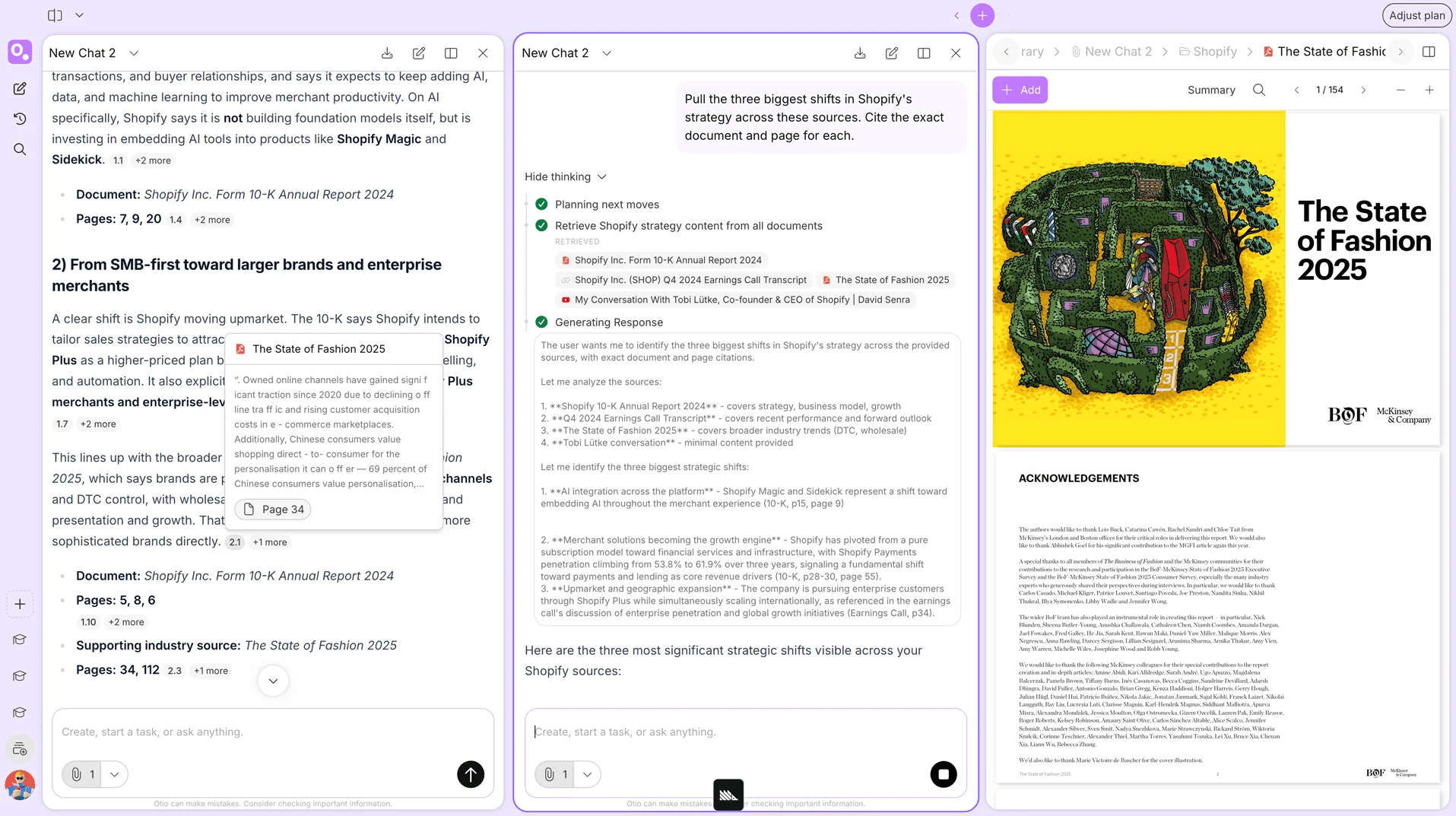
In short
Otio is an AI PDF reader that lets you upload your whole library and ask questions across all of it at once. Every answer links back to the exact page and passage, so you can verify it in one click. Scanned PDFs are read with dedicated OCR, and you can switch between AI models mid-session.
- 200,000+Professionals worldwide
- UnlimitedPDFs per session, no cap
- 7AI models, every tier
How it compares
Other tools break at scale. Otio was built for it.
For one PDF or a quick summary, every tool works. The moment you're working with 30 case files or 80 research papers, the cap shows up. Here's where each one stops.
Single-doc tools, one at a time
Fine for one PDF and a quick question. When you have 30 case files or 80 research papers, you hit the ceiling.
MoreLess
Otio was built for that ceiling - unlimited sources, all queryable in one session.
Caps you at 10 files per message
Upload limits reset every session. Documents don't persist. Citations are frequently hallucinated.
MoreLess
Otio stores your library permanently and cites every answer to the exact page. No invented references.
Stops at 50 sources, one model
Strong citations, but you're locked to Gemini and capped at 50 documents. Scanned PDFs don't work.
MoreLess
Otio supports unlimited sources, every leading AI model, and dedicated OCR for scanned files.
Locked into one ecosystem
Up to 100 files in PDF Spaces, but tied to Adobe's subscription and one AI model.
MoreLess
Otio gives you model choice, unlimited sources, and works with PDFs from any source.
Unlimited sources, cited answers, your choice of model
No document caps, ever
RAG across unlimited sources. 5 PDFs or 500 - chat across all of them in one session. Other tools break at 10, 50, or 100 files.
Every answer cites the exact page
Not a summary that sounds right - a response with a direct link to the specific passage. Click to verify in one click.
Dedicated OCR for scanned PDFs
Otio uses Datalab for scanned and image-based PDFs. Legacy documents, physical scans, older case files - all first-class.
Switch AI models mid-session
Claude, GPT, DeepSeek, Gemini, Grok, Kimi, Llama. All available on every tier. If one model handles your document type better, switch.
How it works
Three steps from upload to verified answer
Drag, drop, ask. Otio pulls findings across everything, cites the exact page, and lets you switch models mid-session.
- 1
Upload anything: PDFs, articles, videos, podcasts
Drag and drop, or connect Google Drive, Zotero, Mendeley, Dropbox, OneDrive, Box.
MoreLess
Scanned PDFs work too — Otio uses dedicated OCR so legacy files are fully readable.
- 2
Chat across your sources with any AI model
Ask questions across all your documents at once. Switch between Claude, GPT, DeepSeek, Gemini, Grok, Kimi, and Llama mid-session. Every answer cites the exact page.
- 3
Start from a structured synthesis, not a blank page
Otio pulls key findings, themes, and quotes across everything. You get a structured starting point you can build on.
MoreLess
You do the thinking — Otio gets you there faster.
Who it's for
Built for the people who actually read 60 PDFs at a time
Researchers, lawyers, consultants, analysts, writers. Anyone whose desk piles up faster than they can read.
Researchers
Stop losing weekends to 60 papers you haven't read. Upload, pull key findings and quotes across all 60 at once.
MoreLess
Start your literature review from a structured synthesis. Every answer cites the exact page.
Lawyers
Stop losing billable hours to discovery piles. Upload case files, depositions, compliance docs.
MoreLess
Pull key facts, themes, contradictions across documents. Verify everything before it leaves your desk.
Consultants
Stop losing Sunday night to 30 client docs. Upload meeting transcripts, reports, briefs.
MoreLess
Pull key points and themes across everything. Build your deliverable on a structured summary in a fraction of the time.
Analysts
Stop losing a day to data you only needed three lines from. Upload data files, research reports, market analysis.
MoreLess
Extract specific figures without reading every page. Build visualisations from CSVs.
Writers & journalists
Stop losing hours to research that never makes it. Upload 50+ sources - articles, videos, podcasts.
MoreLess
Pull arguments across everything grouped by theme. Start writing from a structured synthesis.
See yourself in any of these?
Try Otio free for 7 days. Unlimited sources, every AI model, cited answers. No credit card.
Start freeExact page, exact passage, one click to verify
ChatGPT invents authors, fake journals, page numbers that don't match. Otio cites the exact page and passage in the original source. Click the citation — the document opens to the exact location.
- Otio generates answers only from material you've uploaded. It tells you when something isn't there instead of inventing one. Built for professionals who can't afford to trust unverifiable summaries.
One workspace for every source you actually use
Most AI PDF readers only handle PDFs. Otio ingests PDFs, web articles, YouTube videos, podcast transcripts, and CSVs. Connect your existing tools - Google Drive, Zotero, Mendeley, Dropbox, OneDrive, Box.
-
PDFs + scanned PDFs
Including OCR via Datalab
-
Web articles
Paste URLs or use the extension
-
YouTube + podcasts
2-hour video → 10-min summary
-
CSVs + data files
Extract figures, build visuals
-
Google Drive, Zotero, Mendeley
Sync your existing library
-
Dropbox, OneDrive, Box
Files where they live
In their words
What our users say
As a master's student, @otio has been a game-changer for my thesis work. It's like having a personal research assistant available 24/7! Chatting with research articles and whole folders of content has saved me countless hours of reading and digging through papers.
Masters Student
@otio is really an excellent tool for understanding my papers. It is just like my personal librarian for the internet!
Neuroscience PhD
I took a 2 hour YouTube video and had the AI in Otio summarise it. I then asked follow-up questions about the highlighted pieces that got my attention. All told, I was able to collect key takeaways in less than 10 mins. Amazing.
Researcher
I was fed up fighting with ChatGPT every time I wanted to do a deep dive on a library of research papers I had collected. It's the small things that made me switch - can't recommend it enough.
Policy Analyst
I've been using Otio for a while now and I must say how much I like it! It’s incredibly helpful for summarizing key takeaways from research papers and long videos or podcasts, knowing from the start if the research is what I’m looking for and then allowing me to revisit important points precisely when I need them.
Economist
Truly loved interface: it’s very straight forward and intuitive vs other ai's. Especially vs having 100 tabs open and copy & pasting back and forth from ChatGPT
Pharmaceutical Researcher
Questions
Common questions about Otio's AI PDF reader
Can Otio handle scanned PDFs?
Yes. Otio uses a dedicated OCR service (Datalab) for scanned and image-based PDFs. This is not a generic fallback — it is a first-class feature designed for professionals who work with legacy documents, physical scans, and older case files. Scanned PDFs are fully readable and searchable in Otio. Upload them the same way you would upload any other PDF.
How many PDFs can I upload at once?
Otio supports unlimited sources. There is no cap on the number of PDFs you can upload or chat across in one session. Other AI PDF tools break at 10, 50, or 100 files. Otio uses RAG across unlimited sources, so whether you have 5 PDFs or 500, you can ask questions across all of them at once.
How does Otio cite its answers?
Every Otio answer includes a direct link to the exact page and passage in the original source. Click the citation and the document opens to the specific location. Otio generates answers only from the material you have uploaded and tells you when something is not there, rather than inventing an answer to fill the gap. This is different from tools like ChatGPT, which frequently hallucinate citations with invented authors, fake journals, and page numbers that do not match.
Can I use different AI models for different documents?
Yes. All AI models — Claude, GPT, DeepSeek, Gemini, Grok, Kimi, and Llama — are available on every tier. You can switch between models mid-session without upgrading. There is no model gating and no tier restrictions.
Is my data private?
Otio is designed to work with your sources, not around them. Your documents are stored securely and are not used for model training. For detailed information on data handling, storage, and deletion policies, refer to Otio's Terms of Service and Privacy Policy at otio.ai.
What file types does Otio support besides PDFs?
Otio supports PDFs, web articles, YouTube videos, podcast transcripts, and CSVs. You can also connect Google Drive, Zotero, Mendeley, Dropbox, OneDrive, and Box to sync your existing library. One workspace, all your sources, chat across everything at once.
Why wouldn't I just use ChatGPT?
ChatGPT caps you at 10 files per message, does not persist your documents across sessions, and frequently hallucinates citations. Otio stores your library permanently, supports unlimited sources, and cites every answer to the exact page. Otio gives you access to the same underlying models as ChatGPT plus Claude, DeepSeek, Gemini, Grok, Kimi, and Llama — with your documents living permanently in one place and cited answers built in by default.
What is the pricing model and is there a free plan?
Otio offers a free plan to get started. All features and all AI models are available on the free plan. Paid plans start at $7 per month (Lite) with Go, Pro, and other tiers available at higher usage levels. Otio Pro is available with a 7-day free trial. No credit card required. Cancel anytime.
Keep exploring
AI OCR for PDFs
Scanned and photographed pages become text you can search and question.
OpenMultiple AI models
ChatGPT, Claude, Gemini and more in one workspace. Put two answers side by side.
OpenYouTube video summarizer
Paste a link, get a summary with timestamps, and keep the video as a source you can question.
OpenAI book summarizer
Upload a book, ask about any chapter and get answers tied to the page.
OpenTry Otio on your full PDF library today
7 days free. Unlimited PDFs. Every AI model. Cited answers. No credit card.
Start free