Turn Your Dropbox Library Into a Research Workspace
Turn a Dropbox folder into a research library.
In short
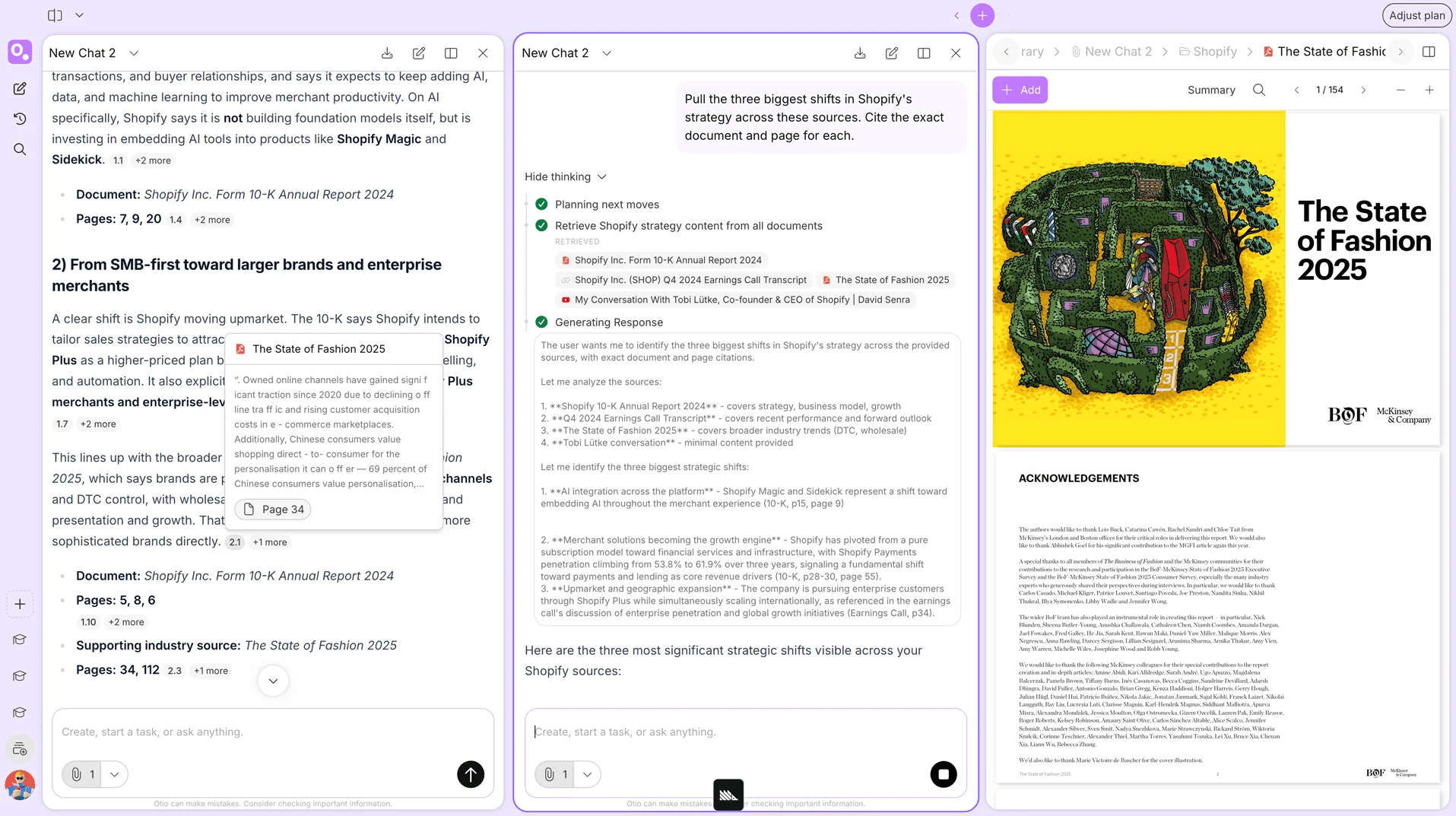
Otio is an AI research assistant, and this page explains its Dropbox integration. You connect your Dropbox account, choose the PDFs, Word documents or CSVs you want, and import them without downloading and re-uploading. You can then ask questions across the whole set with any AI model and get answers cited to the exact page, alongside web articles, YouTube videos and podcasts.
- 200,000+Professionals worldwide
- 74Languages supported
- EveryMajor AI model on every plan
The problem
Stop downloading and re-uploading files you already own
The Dropbox migration problem. Your PDFs, reports, and case files live in Dropbox because that's where your team stores everything. To use most AI research tools, you start from zero every time.
Years of research, locked in Dropbox
Your PDFs, reports, and case files live in Dropbox because that's where your team stores everything.
MoreLess
The download-then-reupload cycle is high enough friction that most professionals never start.
Manual file transfer kills momentum
Every new analysis means find, download, open, upload again.
MoreLess
By the time you're ready to ask your first question, you've lost 20 minutes. Otio eliminates the cycle entirely.
Your library stays where it belongs
Dropbox remains your file home. Otio becomes your research workspace.
MoreLess
No duplication, no version control headaches, no wondering which copy is current.
One connection, unlimited research
Connect your Dropbox account once. From then on, importing files takes seconds.
MoreLess
Mix Dropbox PDFs with web articles, YouTube videos, and podcasts in the same workspace.
Research across your entire library, not one file at a time
Beyond storage - research across everything. Dropbox stores your files. Dropbox Dash finds them. Dropbox AI summarises one at a time. Otio researches across all of them at once, with every leading AI model and cited answers.
Cross-document synthesis
Ask one question, get answers synthesised from your entire Dropbox library, with every claim cited to the exact page.
Every AI model in one place
Claude, GPT, Gemini, DeepSeek, Grok. Switch models mid-session. Compare how each interprets the same Dropbox file.
Cited answers, verify in one click
Every answer traces back to the exact page and passage. Click the citation to jump to the source. No hallucinated references.
Holds more than Dropbox files
Import PDFs from Dropbox. Add articles, YouTube videos, podcasts, CSVs to the same workspace. Query everything together.
How it works
Three steps: connect, import, research
How the Dropbox integration works. No manual configuration, no API keys, no IT involvement. Your files stay in Dropbox; Otio imports only what you select.
- 1
Connect your Dropbox in one click
Authorize Otio to access your Dropbox files in one click. No manual configuration, no API keys, no IT involvement. The connection is direct and secure.
- 2
Select the files you need
Browse your Dropbox folders from inside Otio. Choose the PDFs, Word docs, or CSVs for your current project. Import in seconds, no version confusion.
- 3
Ask across your entire library
Your Dropbox files become part of your research workspace. Pull key findings, compare arguments, or extract specific data across all of them. Every answer cites the exact page.
Who it's for
How professionals use Otio with their Dropbox libraries
Built for source-heavy professionals. Researchers, consultants, lawyers, analysts, writers. Otio works with any source-heavy workflow.
Researchers
Upload 60 papers from Dropbox. Pull key findings across all of them in one query.
MoreLess
Start your literature review from a structured synthesis, with every claim cited to the exact page.
Consultants
Meeting transcripts, client briefs, market reports - all in Dropbox. Pull key points across everything. No more Sunday nights lost to 30 client docs.
Lawyers
Case files, depositions, compliance docs from Dropbox. Pull facts, themes, contradictions across documents.
MoreLess
Every answer traced to the exact source. Stop losing billable hours to discovery piles.
Analysts
Data files and market reports from Dropbox. Extract specific figures without reading every page.
MoreLess
Build visualisations from CSVs. Stop losing a day to data you only needed three lines from.
Writers and journalists
50+ sources in Dropbox - articles, PDFs, transcripts. Pull arguments across all of them, grouped by theme.
MoreLess
Start writing from a structured synthesis instead of a swamp of half-read bookmarks.
Claude, GPT, Gemini, DeepSeek. Choose the model, keep your files.
No model lock-in. Dropbox AI locks you into Dropbox's model. Otio gives you every leading model in one workspace. Switch mid-session. Compare how each interprets the same Dropbox file.
-
Stop stacking subscriptions
Most professionals pay for multiple AI subscriptions because no single tool does it all.
MoreLess
Otio consolidates every model into one workspace. Save the $60-80/month on overlapping subscriptions.
-
Your train of thought stays on the rails
No more copying your prompt, opening a new tab, pasting it into Claude. Ask once. Switch models with one click.
MoreLess
Sources, conversation, and citations stay intact.
-
Model choice matters for research
Claude handles nuanced synthesis. GPT-4 is strong on structured extraction.
MoreLess
Gemini processes large contexts efficiently. Pick the right model per task without rebuilding your workspace.
Every answer traces back to the exact page and passage
Cited answers you can trust. ChatGPT invents authors, fake journals, and page numbers that don't match. Otio generates answers only from the material you've uploaded. Every claim cites the exact source. If the answer isn't in your documents, Otio tells you. Click any citation and jump directly to the source passage. Verify before you write, present, or submit. Lawyers need citations that hold up in discovery. Researchers need references that pass peer review. Otio is built for both. No hallucinated references. No fake page numbers. Click any citation to verify in one click.
Your Dropbox files stay yours
Security and privacy. Otio imports your files into your private workspace. Used only for research within your account. Never used for model training, never shared, never accessible to anyone else.
OAuth-secured Dropbox connection
You control which files Otio can access. Revoke anytime from Dropbox settings.
No model training, ever
Your documents are used only for your research. Never used to train models. Never shared with third parties.
No vendor lock-in
Your research library is exportable. Take your data with you anytime. Dropbox files stay in Dropbox.
Trusted with sensitive work
Lawyers use Otio for discovery. Pharmaceutical researchers for proprietary data. Consultants for client briefs.
In their words
What people say
As a master's student, @otio has been a game-changer for my thesis work. It's like having a personal research assistant available 24/7! Chatting with research articles and whole folders of content has saved me countless hours of reading and digging through papers.
Masters Student
@otio is really an excellent tool for understanding my papers. It is just like my personal librarian for the internet!
Neuroscience PhD
I was fed up fighting with ChatGPT every time I wanted to do a deep dive on a library of research papers I had collected. It's the small things that made me switch - can't recommend it enough.
Policy Analyst
I don't know how you do it but the gap in summary and answer quality to ChatGPT is big. And having real text citations is a game changer.
ESG Reporting Analyst
Questions
Frequently asked
How does the Dropbox-Otio integration work?
Connect your Dropbox account to Otio using OAuth authorization. Once connected, browse your Dropbox folders from within Otio and select the files you want to import into your research workspace. Imported files are immediately available for querying. No manual download or re-upload required. Add more files anytime as your research evolves.
Does Otio use my Dropbox files for model training?
No. Your Dropbox files are imported into your private Otio workspace and used only for research within your account. Otio does not use your documents for model training, does not share them with third parties, and does not make them accessible to other users. Your files are your files.
What is the difference between Dropbox AI and Otio?
Dropbox AI (Dash and built-in summaries) helps you find files and summarize individual documents one at a time. It is designed for enterprise productivity and uses Dropbox's model. Otio researches across unlimited files simultaneously with every AI model (Claude, GPT-4, Gemini, DeepSeek, Grok). Every answer is cited to the exact page and passage. Dropbox stores your files; Otio researches them. The tools are complementary, not competing.
Which file types from Dropbox can I import into Otio?
Otio imports PDFs, Word documents, CSVs, and other common research formats directly from Dropbox. If you store it in Dropbox, you can research it in Otio. Mix file types in the same workspace and query a PDF alongside a CSV and a Word doc without reformatting anything.
Can I add non-Dropbox sources to the same workspace?
Yes. Import PDFs from Dropbox, then add articles from the web, YouTube videos, podcasts, and other sources to the same Otio workspace. Query everything together. Your Dropbox library becomes part of a larger research ecosystem, not an isolated file store.
How do I know Otio's answers are accurate?
Otio generates answers only from the material you have uploaded. Every claim cites the exact source, and you can click any citation to jump directly to the passage in your original document. If the answer is not in your sources, Otio tells you instead of inventing information. No hallucinated references, no fake page numbers.
What happens to my files if I cancel my Otio subscription?
Your Dropbox files remain in Dropbox, unchanged. Your research library in Otio is exportable, so you can take your data with you if you decide to leave. No vendor lock-in. Your files are yours, and your research stays yours.
Can I use Otio for free?
Yes. Otio offers a free trial with full access to every feature: unlimited sources, every AI model, cited answers, and all integrations including Dropbox. No credit card required to start. Try the full product, connect your Dropbox library, and see if Otio saves you hours in the first week.


Bring ten sources. Ask one question.
That is enough to see whether Otio earns a place in your work. Free to start, no card.
Start free