Research across your entire Box document library
Question your Box documents with cited answers.
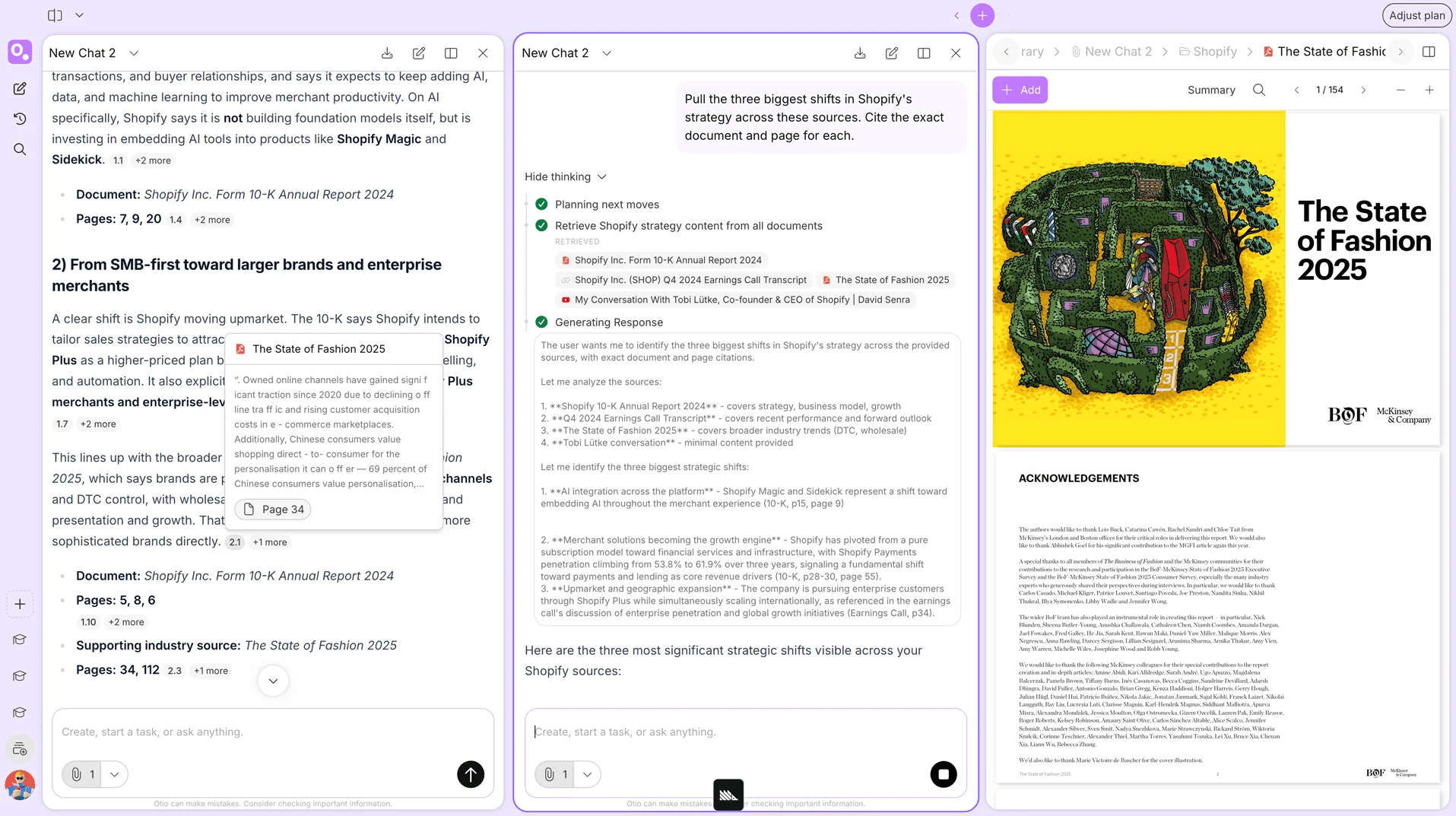
In short
Otio is an AI research assistant, and this page describes its Box integration. You connect your own Box account without any IT deployment, import the files you can already view, and ask questions across them with any AI model. Every answer is cited to the exact page and passage, and Box files can be queried together with web articles, videos and podcasts.
- 200,000+Professionals worldwide
- 2 minsTo connect Box, no IT needed
- EveryAI model, no model lock-in
The problem
Your files are in Box. Your analysis tool is somewhere else.
The download-upload problem. Download 30 files. Upload them to ChatGPT. Lose context when the session resets. Start over tomorrow. The gap between Box storage and research costs hours every week.
Files in Box, analysis tool elsewhere
Your institutional documents live in Box. Your research workflow lives somewhere else.
MoreLess
The gap between them costs you hours every week - downloading, re-uploading, losing context when sessions reset.
Individual file summaries don't scale
Box AI summarises one document at a time. When you need to research across 50 case files or 100 client reports, the per-file approach breaks down.
MoreLess
Cross-referencing themes requires a different tool.
Model lock-in limits your research
Box AI uses one model. Claude might interpret legal language better. GPT might handle technical specs more clearly.
MoreLess
Switching models means switching platforms and re-uploading files.
No permanent research library
ChatGPT forgets your files after the session ends. Box AI doesn't build a persistent workspace where your documents, queries, and insights accumulate over time. Every new project starts from zero.
Cross-library research, not just individual file Q&A
What Otio adds to Box. Box AI is great for individual file summaries. Otio is built for the rest - cross-library synthesis, every AI model, page-level citations, persistent research workspace.
Cross-library synthesis
Box AI does individual files. Otio researches across unlimited files at once - 60 papers, 30 client briefs, 100 case files. Pull findings across everything.
Every AI model, no restrictions
Box AI uses one model. Otio gives you Claude, GPT, Gemini, DeepSeek, Grok, Kimi, Llama on every tier. Switch mid-research without re-uploading.
Page-level citations
Every claim cites the exact page and passage. Click to verify. No hallucinated references, no invented authors. Verification built in.
No IT approval required
Connect at the individual user level. No enterprise deployment.
MoreLess
Respects your existing Box access controls - you only import files you can already view.
How it works
Connect Box to Otio in three steps
How it works. Individual user level, no IT approval. Files stay in Box; Otio imports them for research within your workspace.
- 1
Connect your Box account
Authorise Otio to access your Box library at the individual user level. No enterprise IT deployment required. Takes less than two minutes.
- 2
Select files to import
Choose the documents you need - PDFs, Word, CSVs, or entire folders.
MoreLess
Import to your Otio research library with one click. No manual downloading, no file size limits.
- 3
Query across your library
Query your entire Box collection simultaneously. Switch between Claude, GPT, Gemini, DeepSeek without re-uploading.
MoreLess
Every answer cites the exact page and passage.
Who it's for
How enterprise professionals use Otio with Box
Legal, consulting, analysis, policy, research - anyone whose Box library is full of documents that need cross-referencing.
Legal
Upload case files, depositions, and compliance documents from Box.
MoreLess
Ask Otio to pull key facts, themes, and contradictions across the entire discovery pile. Every answer traced to the exact source.
Consulting
Import meeting transcripts, client briefs, and project reports from Box. Pull key points and themes across everything.
MoreLess
Build your deliverable from a structured summary instead of a blank page.
Analysis
Upload data files, research reports, and market analysis from Box. Extract specific figures without reading every page.
MoreLess
Create visualisations from your CSVs. Research that used to take a day takes an hour.
Policy & compliance
Import regulatory filings, policy documents, and compliance reports from Box.
MoreLess
Query across them to identify requirements, gaps, conflicts. Compliance reviews become systematic, not scavenger hunts.
Research
Upload 60 papers from Box. Pull key findings and quotes across all of them at once.
MoreLess
Start your literature review from a structured synthesis, not a blank page.
Your Box files stay under your control
Security and data handling. Documents imported from Box are used only for research within your workspace. Not used for AI model training. Not shared with third parties. Your existing Box access controls fully respected.
-
Documents used only for research
Files imported from Box are used only within your workspace. Not used for AI model training. Documents stay under your control.
-
Individual user connection
Otio connects at the individual user level. No enterprise-wide deployment.
MoreLess
Respects your existing Box access controls - you only import files you already have permission to view.
-
No hallucinated references
Otio cites every claim back to the exact source. No invented authors, no fake page numbers.
MoreLess
When something isn't in your uploaded material, Otio tells you instead of inventing an answer.
-
Verify every answer in one click
Click any citation to see the source passage in context. Check the exact page and verify the claim before you use it. Research accuracy made transparent.
In their words
What people say
As a master's student, @otio has been a game-changer for my thesis work. It's like having a personal research assistant available 24/7! Chatting with research articles and whole folders of content has saved me countless hours of reading and digging through papers.
Masters Student
@otio is really an excellent tool for understanding my papers. It is just like my personal librarian for the internet!
Neuroscience PhD
I was fed up fighting with ChatGPT every time I wanted to do a deep dive on a library of research papers I had collected. It's the small things that made me switch - can't recommend it enough.
Policy Analyst
I don't know how you do it but the gap in summary and answer quality to ChatGPT is big. And having real text citations is a game changer.
ESG Reporting Analyst
Questions
Frequently asked
Does Otio replace Box?
No. Box stays your file storage and team sharing. Otio adds the research layer on top — connect Box, pull in the files you want to work with, and run AI synthesis across them. Files stay in Box, accessed via your existing permissions.
How does the Box-Otio integration work?
Connect your Box account to Otio at the individual user level. Select the files you need and import them into your Otio research library with one click. The files are immediately available for querying. No manual download-upload cycle required. Your files stay in Box; Otio imports them for research within your workspace.
What is the difference between Box AI and Otio?
Box AI covers individual file summaries and Q&A within the Box platform. Otio researches across unlimited files simultaneously, with every AI model available and every answer cited to the exact page and passage. Box AI is built for document management and per-file analysis. Otio is built for cross-library research and synthesis. The two are complementary: Box for storage, Otio for research depth.
Does Otio use my Box files for model training?
No. Documents imported from Box are used only for research within your workspace and are not used for AI model training. Your documents stay under your control. Otio generates answers only from the material you have uploaded.
Which file types from Box can I import into Otio?
PDFs, Word documents, CSVs, and other supported formats. The integration respects your existing Box access controls. You can only import files you already have permission to view.
Can I combine Box documents with other source types in one research session?
Yes. Box PDFs and reports can be queried alongside web articles, YouTube videos, podcasts, and other sources you have added to the same Otio workspace. Ask one question across all of them. Otio synthesizes findings and cites every claim back to the exact source.
Do I need IT approval to connect Box to Otio?
Otio connects at the individual user level. No enterprise IT deployment required. No waiting for approval. The integration takes less than two minutes. Your files stay in Box; Otio imports them for research within your workspace.
How does Otio ensure citation accuracy?
Otio cites every claim back to the exact page and passage. Click the citation to verify the source in context. Otio generates answers only from the material you have uploaded. When something is not in your uploaded material, Otio tells you instead of inventing an answer to fill the gap. No hallucinated references. No invented authors or fake page numbers.
What AI models are available for Box file research?
Claude, GPT, Gemini, DeepSeek, Grok, Kimi, Llama, and more. Every model is available on every tier. Choose the model that interprets your content best. Switch models mid-research without losing context or re-uploading files.


Bring ten sources. Ask one question.
That is enough to see whether Otio earns a place in your work. Free to start, no card.
Start free