Zotero AI: Research Across Your Reference Library
Ask across your whole reference library.
In short
Otio is an AI research assistant, and this page is about its Zotero integration. You connect your Zotero account, import all or part of your library, and ask questions across the papers you have already collected. Answers come from your own sources and are cited to the exact paper, page and passage. You can use Claude, GPT, Gemini or DeepSeek on the same collection.
- 200,000+professionals trust Otio
- 74languages
Your Zotero Library Took Years to Build. Research Across All of It in Minutes.
Connect Otio to Zotero and turn your curated paper collection into a researchable, AI-interrogatable workspace. Every reference you've organized, every PDF you've collected, becomes queryable across Claude, GPT, Gemini, and DeepSeek. No re-uploading. No starting from scratch. The library you built stays exactly where it is, and Otio brings every AI model to it.
Page-Level Citations from the Papers You Curated
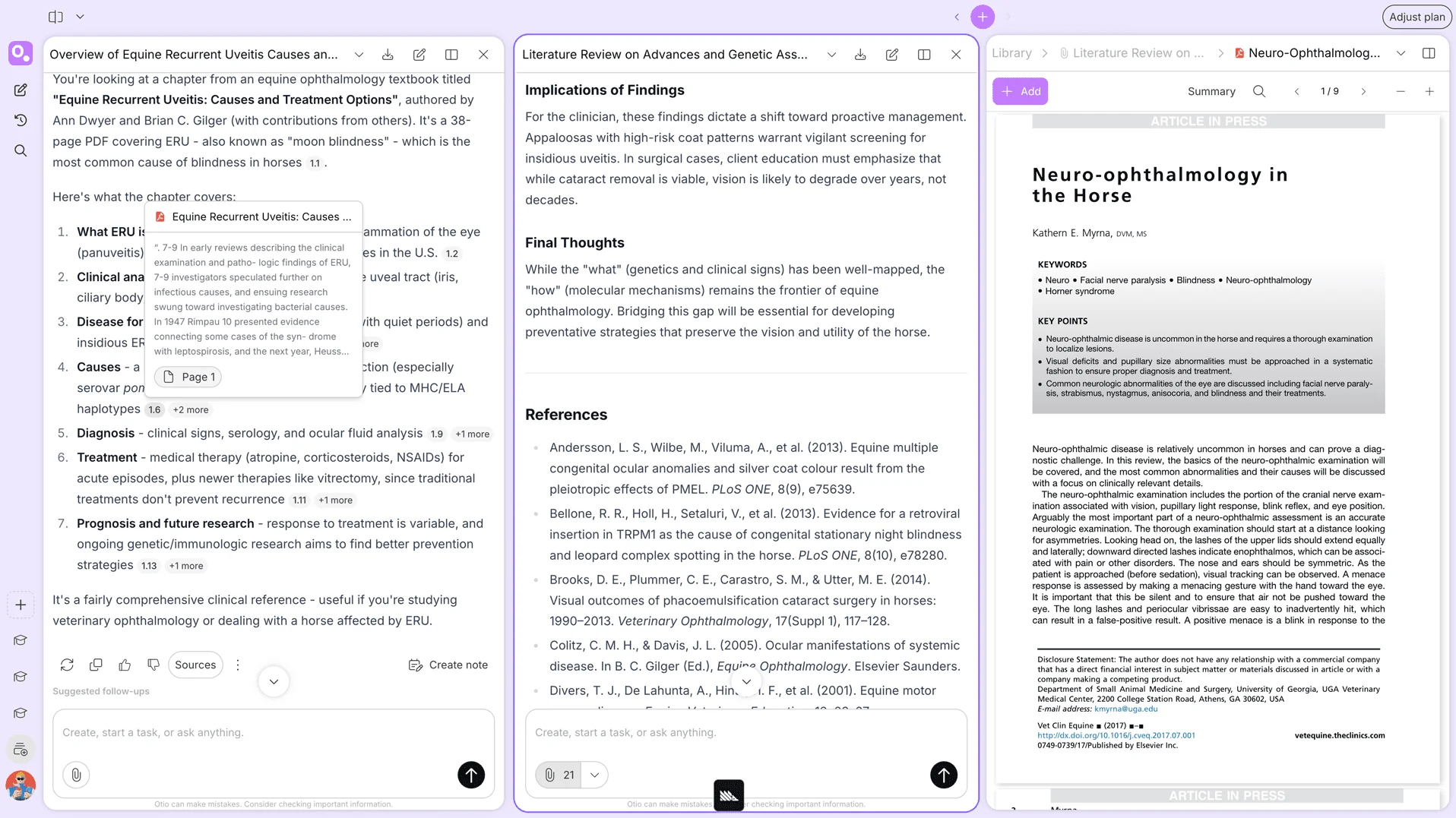
Every answer cites the exact paper, page, and passage from your Zotero collection.
MoreLess
The citation rigor you expect from academic work, built into every AI response. Check the source in one click. Verify before you write.
Trusted by 200,000+ Researchers Across 74 Languages
PhD students, post-docs, and academic researchers use Otio to research across their reference libraries without losing the organization they've built.
MoreLess
Master's students cite it as a tool that changes how thesis work gets done. Start free today and connect your Zotero library.
Zotero Organizes Your References. Otio Lets You Research Across Them.
-
Zotero Manages Thousands of Papers. AI Tools Ignore Them.
Academic AI tools like Elicit and Paperguide search external databases, not your personal Zotero collection.
MoreLess
The papers you specifically curated, annotated, and organized for your research area sit unused while you search databases for papers you may have already collected. ChatGPT and Claude require manual uploads. For a library of 500 papers, that means 500 individual upload sessions, defeating the purpose of having an organized reference manager in the first place.
-
Otio Connects to Your Zotero Library Directly
Import your entire Zotero collection or select the subset relevant to your current project.
MoreLess
Papers become immediately queryable across every AI model without leaving Otio or re-uploading a single file. Ask questions that span your entire collection. Pull key findings and quotes across 60 papers at once. Start your literature review from a structured synthesis, not a blank page.
-
Research Your Collection, Not Just a Database
External tools search for papers that match keywords. Otio researches the papers you already decided were relevant, the ones you've read, annotated, and organized into collections for your specific research question.
MoreLess
The difference is curation. Generic database searches return everything that matches a term. Otio researches the subset you've already determined matters for your work.
-
Every AI Model Interprets Your Papers
Claude, GPT, Gemini, DeepSeek. Choose which model analyzes your Zotero collection. Switch to compare interpretations.
MoreLess
No restrictions, no model lock-in. Different models excel at different tasks. Claude for nuanced synthesis, GPT for structured summaries, Gemini for cross-referencing. Otio gives you all of them in one workspace.
Cited to the Exact Page and Passage. The Precision Academic Research Requires.
Every Answer Cites the Source
Otio generates answers only from the material you've uploaded and cites every claim back to the exact paper, page, and passage.
MoreLess
Check the source in one click. Verify before you write. When something isn't in your collection, Otio tells you rather than inventing an answer to fill the gap. No hallucinated references, no fake journals, no page numbers that don't match.
Page-Level, Passage-Level Attribution
Citations include the paper title, author, page number, and the exact passage from the text.
MoreLess
The same granularity you'd use for manual citation practice, applied to AI-generated answers. Trace every answer back to the exact source. The citation rigor you expect from a reference manager, built into every AI response.
Built for Researchers Who Care About Attribution
Academic researchers use Zotero specifically because they care about proper attribution and citation accuracy.
MoreLess
Otio respects that standard and applies it to AI research output. The gap in citation quality between Otio and ChatGPT is significant. Real text citations, not invented references. Researchers notice the difference immediately.
Verify Everything Before It Leaves Your Desk
Click any citation to jump to the exact passage in the source document. Read the context. Confirm the interpretation.
MoreLess
Academic work requires verification, and Otio makes it instant.
How it works
Connect Once. Research Immediately.
- 1
Connect Your Zotero Account
Authorize Otio to access your Zotero library through a secure OAuth connection.
MoreLess
No manual file exports, no CSV uploads, no copy-pasting metadata. The connection takes less than a minute. Once authorized, your Zotero collections appear in Otio's import interface.
- 2
Import Your Papers (All or Selected)
Import your entire Zotero library or select specific collections relevant to your current project.
MoreLess
A researcher with 5,000 references can import just the 80 papers relevant to their dissertation chapter. Otio imports the full PDF text, not just citation metadata. Your annotated PDFs from Zotero become queryable across every AI model.
- 3
Ask Questions Across Your Collection
Papers become immediately queryable. Ask Otio to pull key findings across all 60 papers in your literature review.
MoreLess
Extract themes, contradictions, and methodological patterns across your entire collection. Every answer cites the exact page and passage. Check the source in one click. Start your literature review from a structured synthesis, not a blank page.
- 4
Switch Models, Compare Interpretations
Claude for nuanced synthesis. GPT for structured summaries. Gemini for cross-referencing.
MoreLess
Choose the model that interprets your papers best, or switch to compare. Different models excel at different tasks. Otio gives you all of them in one workspace, analyzing the same Zotero collection.
Zotero Papers Alongside Web Articles, Videos, and Reports. One Question Across All of It.
-
Research Projects Cross Source Boundaries
A literature review includes academic papers from Zotero, but also web articles, YouTube lectures, podcast interviews with researchers, and institutional reports.
MoreLess
Zotero manages the papers. Otio researches across all of it. Upload 50+ sources in any format. Ask Otio to pull arguments across everything, grouped by theme. Start writing from a structured synthesis instead of a swamp of tabs and half-read bookmarks.
-
One Workspace for Every Source Type
Zotero PDFs and academic papers in the same Otio session as web articles, YouTube videos, podcasts, meeting transcripts, and CSV data files.
MoreLess
One question across all of them, every answer cited to the exact source. Connect Google Drive, Dropbox, OneDrive, or Box alongside your Zotero library. Institutional documents and personal research files in one workspace.
-
Cited Synthesis Across Source Types
Ask Otio to compare findings from your Zotero papers with arguments from web articles and YouTube lectures.
MoreLess
Every answer cites the exact source, whether it's a page number from a PDF or a timestamp from a video. The citation precision you expect from academic work, applied to every source type. No guessing where an idea came from.
-
Revolutionary Podcast and Video Summarization
Take a 2-hour YouTube lecture and have Otio summarize it in minutes.
MoreLess
Ask follow-up questions about the highlighted pieces that got your attention. Collect key takeaways in less than 10 minutes. Podcast summarization is revolutionary for researchers who have hundreds of podcasts and videos to watch but either are too busy or don't have enough time.
Who it's for
How Researchers Use Otio with Zotero
More than a third of the sources researchers added to Otio in the last 30 days were audio or video - interviews, podcasts, lectures. Spoken content is now a major research input class, and Otio treats it as a first-class source alongside written material.
Literature Review: 60 Papers, One Structured Synthesis
Upload your papers from Zotero and pull key findings and quotes across all 60 at once.
MoreLess
Ask Otio to identify themes, contradictions, and methodological patterns across your entire collection. Start your literature review from a structured synthesis, not a blank page. Every answer cites the exact page and passage. Check it in one click.
Thesis Work: Your Personal Research Assistant, 24/7
As a master's student, Otio has been a tool that changes how thesis work gets done.
MoreLess
Chatting with research articles and whole folders of content saves countless hours of reading and digging through papers. Connect your Zotero library and ask questions across your entire reference collection. The papers you curated for your thesis become a researchable workspace.
Systematic Review: Cross-Referencing Across Studies
Ask Otio to compare methodologies, sample sizes, and findings across 40 studies in your Zotero collection.
MoreLess
Extract specific figures without reading every page yourself. Identify which studies support or contradict each hypothesis. Every answer traced back to the exact source for verification.
Cross-Disciplinary Research: Connecting Disparate Sources
Research projects that cross disciplinary boundaries require synthesizing papers from neuroscience, psychology, and computer science.
MoreLess
Otio researches across all of them simultaneously, citing each source precisely. Ask questions that span your entire Zotero collection, regardless of field. The AI models interpret the content, and Otio cites the exact passage from each paper.
How it compares
How Otio Compares to Zotero Alone, ChatGPT, and Database Search Tools
Citation Management, Not Research
Zotero organizes your references and manages citations. It doesn't provide AI research capabilities across your collection.
MoreLess
Otio connects to Zotero and adds the research layer, turning your reference library into a queryable workspace. Zotero for citation management. Otio for research across what Zotero stores. Complementary tools for different parts of the academic workflow.
Hallucinated References, No Source Memory
ChatGPT invents references. Fake authors, fake journals, page numbers that don't match.
MoreLess
Otio generates answers only from the material you've uploaded and cites every claim back to the exact source. ChatGPT forgets your sources an hour later. Otio builds a permanent, researchable library that remembers everything you've uploaded.
Every AI Model, Your Curated Collection, Cited Answers
Research across your curated collection with page-level citations. The precision academic work requires, applied to AI research output.
In their words
What people say
As a master's student, @otio has been a game-changer for my thesis work. It's like having a personal research assistant available 24/7! Chatting with research articles and whole folders of content has saved me countless hours of reading and digging through papers.
Masters Student
@otio is really an excellent tool for understanding my papers. It is just like my personal librarian for the internet!
Neuroscience PhD
I took a 2 hour YouTube video and had the AI in Otio summarise it. I then asked follow-up questions about the highlighted pieces that got my attention. All told, I was able to collect key takeaways in less than 10 mins. Amazing.
Researcher
I don't know how you do it but the gap in summary and answer quality to ChatGPT is big. And having real text citations is a game changer.
ESG Reporting Analyst
This is the exact tool I've been looking for…I've gathered an overwhelming collection of over 700 bookmarks and 190 open web browser tabs. These resources are my roadmap to research, but navigating through them has become increasingly challenging. This has been the beacon I need in this sea of information.
Founder
Questions
Frequently asked
How does the Zotero-Otio integration work?
Connect your Zotero account through a secure OAuth connection. Import your entire library or select specific collections relevant to your current project. Papers become immediately queryable across every AI model without manual download or re-upload. The integration takes less than a minute to set up. Once authorized, your Zotero collections appear in Otio's import interface.
Does Otio work with my annotated PDFs from Zotero, or just the metadata?
Otio imports the full PDF text from your Zotero library, not just citation metadata. Your annotated PDFs become queryable across every AI model, and Otio cites the exact page and passage from the actual paper text. Annotations you have made in Zotero are preserved. The full content of your curated collection becomes researchable in Otio.
Can I import just part of my Zotero library, or does it have to be everything?
Import selectively. A researcher with 5,000 references can import just the 80 papers relevant to their current dissertation chapter. Choose specific collections or individual papers. Your Zotero library stays in Zotero. Otio imports what you need for the current project without forcing you to migrate your entire reference collection.
How does Otio cite answers from my Zotero papers?
Every answer includes the paper title, author, page number, and the exact passage from the text. Click any citation to jump to the exact passage in the source document. The same granularity you would use for manual citation practice, applied to AI-generated answers. Page-level, passage-level precision.
What is the difference between Otio and Zotero's own AI features?
Zotero 7 includes some PDF reading and annotation features. Otio provides AI research across your entire collection with every AI model, cited cross-document synthesis, and the ability to connect Zotero papers with other source types such as web articles, videos, and podcasts. Zotero handles citation management. Otio handles research across what Zotero stores. They are complementary tools for different parts of the academic workflow.
Does Otio also work with Mendeley?
Yes. Otio integrates with both Zotero and Mendeley. Connect either reference manager and import your curated paper collection into Otio's research workspace. The same citation precision and AI research capabilities apply to both Zotero and Mendeley libraries.
Can I trust Otio to give me accurate information?
Otio generates answers only from the material you have uploaded and cites every claim back to the exact source. When something is not in your collection, Otio tells you rather than inventing an answer to fill the gap. No hallucinated references, no fake journals, no page numbers that do not match. The citation rigor you expect from academic work, built into every AI response.
Are my Zotero files used for AI model training?
No. Your Zotero library and the papers you upload to Otio are not used for AI model training. Your research stays private. Otio processes your files to generate cited answers, but the content is not shared with AI model providers for training purposes.
Keep exploring
Academics
A permanent library for papers and notes, with page-level citations on every answer.
OpenAI PDF reader
Ask across a whole library of PDFs. Every answer points to the page it came from.
Open
Dropbox
Turn a Dropbox folder into a research library.
OpenPricing
Free, Go and Pro, with what each plan includes.
OpenBring ten sources. Ask one question.
That is enough to see whether Otio earns a place in your work. Free to start, no card.
Start free