AI data analysis that connects your CSVs to your documents
Connect your CSVs to the documents that explain the numbers.
In short
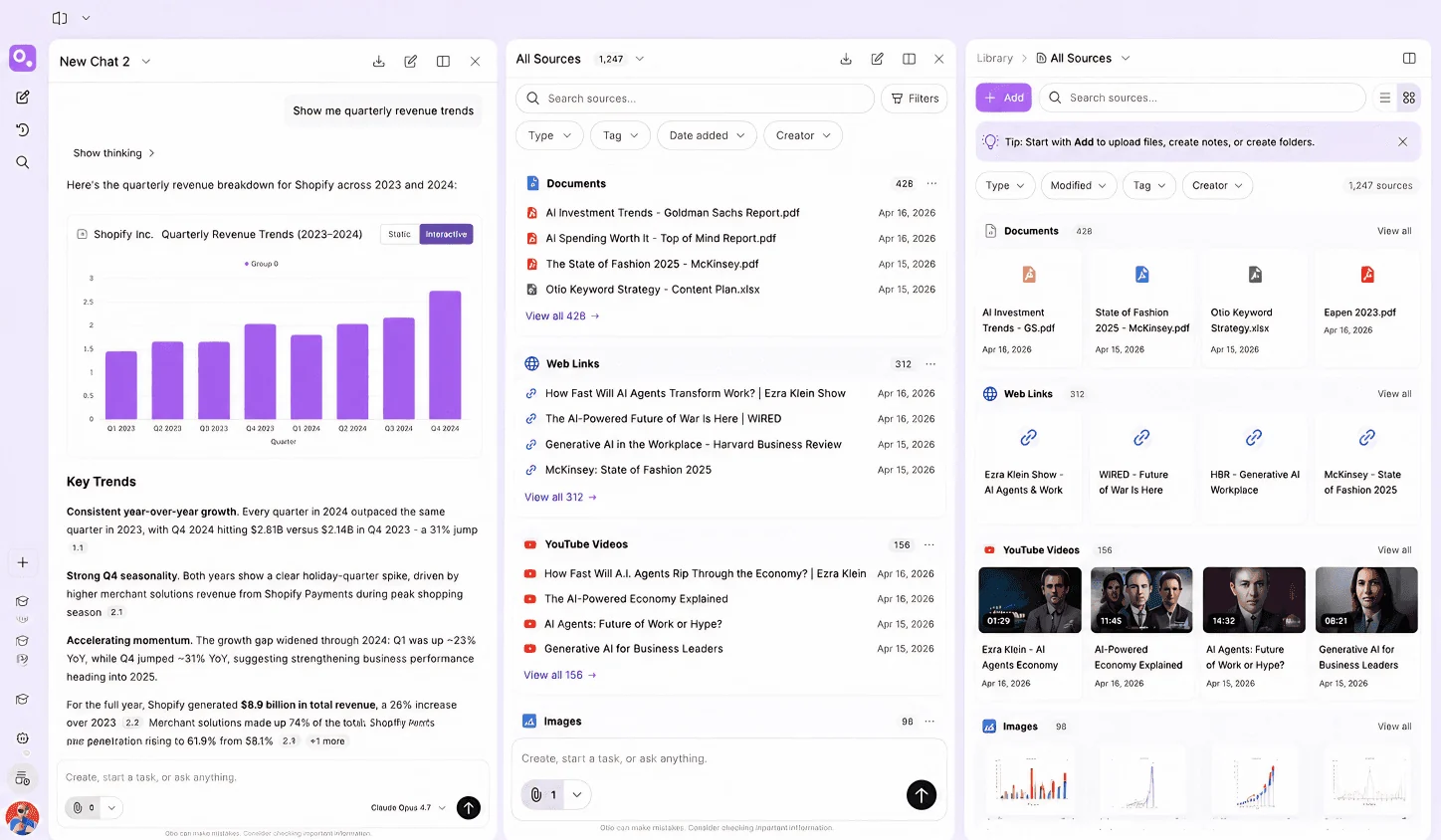
Otio is an AI research workspace where you can upload a CSV and the PDFs, transcripts and reports that explain it, then ask one question across both. Answers are cited to the exact page or data point, and charts come from plain-language questions. It is built for analysts and researchers whose work spans data and text, not for enterprise BI dashboards or live data connections.
- 200,000+Professionals worldwide
- CSV + PDFIn the same workspace
- EveryAI model on every plan
The problem
Stop losing context between your data tool and your document tool
Analysts and researchers spend mental energy bridging data and text across separate platforms. Every tool switch loses the thread.
Data in one tool, documents in another
Financial analysts upload CSVs to one platform and read earnings transcripts in another.
MoreLess
Environmental consultants analyse survey data separately from the compliance reports that contextualise it. The findings sit disconnected from the documents that explain them.
Copy, paste, lose your train of thought
Extract a figure from your CSV. Switch to your document tool. Paste the number into a prompt. Wait. Switch back.
MoreLess
Compare. Lose momentum somewhere in the middle. The workflow breaks your focus.
General AI tools forget your data
ChatGPT and Claude accept file uploads but don't store your data. Every session starts from scratch.
MoreLess
No persistent workspace, no connection between your CSV and your PDFs. The analysis you did yesterday is gone.
BI platforms don't handle documents
Power BI and Tableau are powerful for dedicated data teams.
MoreLess
But they don't analyse PDFs, transcripts, or research papers. If your work spans data and text, you're still using two tools.
Ask one question across your CSV and your PDFs
Upload your CSV and the reports that explain it. Get cited answers that span both sources. Every claim traced back to the exact page or data point.
Plain-language visualisations
No formulas, no config. Ask 'show me revenue trends by quarter.' Otio generates the chart. Trends, comparisons, outlier detection.
Earnings data + transcript
Upload quarterly earnings CSV + earnings call transcript. Ask: what drove Q3 revenue and what did leadership say? Cited answers from both sources.
Survey data + compliance doc
Upload environmental monitoring data + regulatory compliance filing. Otio flags outliers in your data and cites the specific regulatory limits.
Every AI model, no restrictions
Choose Claude, GPT, Gemini, or DeepSeek to interpret your data. Switch between models to compare. All models on all plans.
How it works
Three steps: upload, ask, export
CSVs and documents in the same workspace. Plain-language questions. Charts and cited answers, in one place.
- 1
Upload your CSV and your documents
Drag and drop CSVs, PDFs, articles, transcripts, reports. Connect Google Drive, Zotero, Mendeley, Dropbox, OneDrive, Box. Everything stays in one workspace.
- 2
Ask in plain language
"Show me revenue trends by quarter." "Which data points exceed the threshold in the compliance doc?" Every answer cites the exact page or data point. Switch AI models any time.
- 3
Export your analysis when ready
Generate charts and visualisations. Pull key findings from your documents.
MoreLess
Build your deliverable from a structured synthesis. Analysis stays in your workspace - come back any time.
Otio is not a BI platform
For enterprise dashboards, live data connections, and full BI workflows, Power BI and Tableau are the right tools. Otio is built for analysts and researchers who need ai data analysis to connect to their documents.
-
Where Otio wins
CSV analysis and chart generation inside the same workspace as PDFs.
MoreLess
Cross-source questions spanning data and text simultaneously. Every AI model, every plan.
-
Permanent storage
The CSV and its analysis stay in your workspace. Come back next week. Ask new questions. Nothing resets between sessions.
-
Research-scale, not enterprise-scale
Optimised for research CSVs and data files. Not for enterprise-scale data pipelines or real-time dashboards - use a dedicated BI tool if that's the workflow.
-
What Otio does NOT do
No financial modelling. No live data feeds. No enterprise BI dashboards. Otio accelerates the research phase that feeds your models and reports.
Who it's for
Built for the intersection of data and text
Financial analysts, environmental consultants, academic researchers, policy professionals. Anyone whose work spans CSVs and documents.
Financial analysts
Upload quarterly earnings CSVs and earnings call transcripts.
MoreLess
Ask: what drove the revenue increase, and what did leadership say about it? Otio pulls figures from data and executive commentary from transcripts. One answer, two sources, fully cited.
Environmental consultants
Upload environmental monitoring data and regulatory compliance filings.
MoreLess
Ask: are there any data points that exceed the thresholds in the compliance doc? Otio flags outliers and cites the specific regulatory limits.
Academic researchers
Upload experimental survey data and 20 research papers. Ask: how do my results compare to findings in the literature?
MoreLess
Otio identifies patterns and cross-references with papers, every comparison cited to the exact source.
Policy professionals
Upload market analysis CSVs and policy briefing documents. Ask: what trends in the data align with the policy recommendations?
MoreLess
Otio connects data trends to policy context, every claim traced back to source.
In their words
What people say
As a master's student, @otio has been a game-changer for my thesis work. It's like having a personal research assistant available 24/7! Chatting with research articles and whole folders of content has saved me countless hours of reading and digging through papers.
Masters Student
@otio is really an excellent tool for understanding my papers. It is just like my personal librarian for the internet!
Neuroscience PhD
I took a 2 hour YouTube video and had the AI in Otio summarise it. I then asked follow-up questions about the highlighted pieces that got my attention. All told, I was able to collect key takeaways in less than 10 mins. Amazing.
Researcher
I was fed up fighting with ChatGPT every time I wanted to do a deep dive on a library of research papers I had collected. It's the small things that made me switch - can't recommend it enough.
Policy Analyst
I've been using Otio for a while now and I must say how much I like it! It’s incredibly helpful for summarizing key takeaways from research papers and long videos or podcasts, knowing from the start if the research is what I’m looking for and then allowing me to revisit important points precisely when I need them.
Economist
Truly loved interface: it’s very straight forward and intuitive vs other ai's. Especially vs having 100 tabs open and copy & pasting back and forth from ChatGPT
Pharmaceutical Researcher
Questions
Frequently asked
Is Otio a replacement for Power BI or Tableau?
No. Otio is a research workspace that includes CSV analysis, not a BI platform for dashboards, live data connections, or enterprise reporting. For dedicated BI workflows, Power BI and Tableau are the right tools. Otio is built for analysts and researchers who need CSV data to connect to their documents.
What can I ask about a CSV in plain language?
Ask Otio to identify trends, compare data points across rows or columns, summarize statistics, or flag outliers. Otio generates charts and visualizations from your questions. Examples: 'Show me revenue trends by quarter,' 'Which data points exceed the threshold?' or 'Compare Q3 performance across regions.'
Can I analyse my data alongside PDFs in the same session?
Yes. Upload your CSV and your documents into the same workspace. Ask questions that span both sources. Otio pulls answers from your data and your text simultaneously. Every answer is cited back to the exact page or data point.
What size CSV files can Otio handle?
Otio is optimized for research-scale data. Most CSVs used in research, consulting, and analysis workflows are supported. If you need enterprise-scale data pipelines or real-time dashboards, a dedicated BI tool is the better fit.
What types of charts can Otio generate?
Otio generates charts based on your plain-language questions: trend lines, comparisons, bar charts, and summary statistics. The visualization appears in your workspace alongside your other sources. Export when ready.
Can I trust Otio to give me accurate information?
Otio generates answers only from the material you have uploaded. It cites every claim back to the exact source and tells you when something is not in your sources, rather than inventing an answer to fill the gap. No hallucinated references. Every answer traced back to your data or your documents.
Why wouldn't I just use ChatGPT for data analysis?
ChatGPT accepts file uploads, but it does not store your data. Every session starts from scratch. There is no persistent workspace and no connection between your CSV and your PDFs. Otio keeps your data and documents in one workspace permanently. The analysis you did yesterday is still there. The context you built is preserved.
Is there a free plan?
Otio has a free plan to start, and paid plans from $7 per month. All plans include access to all AI models including Claude, GPT, Gemini, and DeepSeek. There are no feature gates — CSV analysis and cross-source querying are available on every plan. No credit card required to start.
Keep exploring
Spreadsheet AI
Question your spreadsheets alongside the reports they belong to.
OpenAI data visualization
Describe the chart you want in plain language. Otio draws it from your CSV, next to the documents that explain it.
OpenFinancial analysis
Earnings calls, filings and due diligence. Exact quotes with the speaker and the page.
OpenMultiple AI models
ChatGPT, Claude, Gemini and more in one workspace. Put two answers side by side.
OpenAnalyse your data in the same workspace as your documents
CSV + PDF in one session. Every AI model. Cited answers. No credit card.
Start free