Spreadsheet AI that connects your data to your research
Question your spreadsheets alongside the reports they belong to.
In short
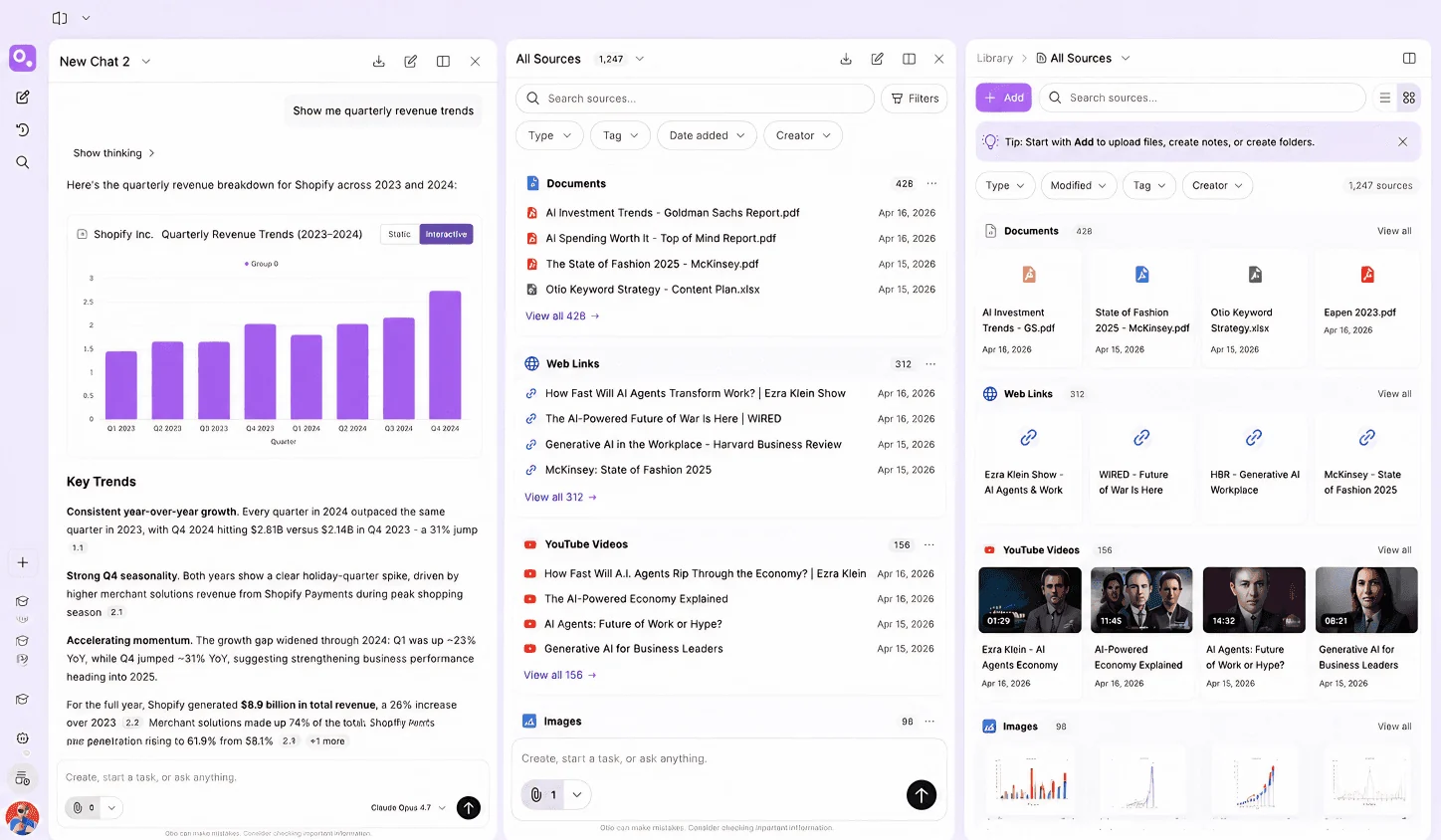
Otio is an AI research assistant that analyzes your CSV data alongside the PDFs, transcripts and articles that explain it. Upload a spreadsheet, ask plain-language questions, and get charts and figures cited to the exact source, with no formulas or pivot tables. It does not work inside Excel or Sheets: the spreadsheet is one source in a research workspace where a single question can span both data and documents.
- 200,000+Professionals worldwide
- CSV + PDFIn the same workspace
- EveryAI model on every plan
Upload your CSV and your report
Ask one question across both. Otio puts spreadsheet data and your PDFs, transcripts, and articles in the same workspace - cited to the exact source.
What you can do with a CSV in Otio
Upload your spreadsheet, ask plain-language questions, and get visualizations cited back to the data. Cross-reference figures against the documents that explain them - in one workspace.
Ask in plain language, get charts
Upload your CSV and ask what you want to know. Otio generates the visualization. No formulas, no pivot table configuration.
Extract figures without reading every row
Pull exact numbers from a 500-row dataset in seconds. Ask for totals, averages, or specific values and Otio surfaces them with context.
Cross-reference data with documents
Upload the earnings CSV and the earnings call transcript. Ask one question that spans both, cited to the exact source.
Switch AI models to compare interpretations
Ask the same question using ChatGPT, Claude, or Gemini. No tier gating. Choose the model that interprets your dataset most accurately.
If you need AI inside Excel or Sheets, this isn't it
If you need AI to generate formulas, build pivot tables, or work inside Excel cells, tools like Copilot or Numerous.ai handle that well. Otio is built for a different workflow — when you have data in a CSV that needs to be understood alongside the report, paper, or transcript that explains it.
-
Otio doesn't replace your spreadsheet. It reads your data.
The spreadsheet is a source in your research workspace, not the whole workflow.
MoreLess
Upload the CSV alongside the documents that explain it and ask one question across both.
-
Data analysis as part of research, not separate from it
The figure you extracted from a spreadsheet in one tab is answerable in the same session as the paper that explains what caused it. No context-switching, no fragmentation.
-
Built for analysts and researchers who work across sources
Financial analysts cross-referencing earnings data with call transcripts.
MoreLess
Environmental consultants pulling compliance figures while reviewing regulatory filings. Researchers analyzing survey data alongside literature.
How it works
From upload to insight in 3 steps
- 1
Upload your CSV and related documents
Drag your CSV into Otio alongside the PDFs, reports, or transcripts that provide context.
MoreLess
Connect Google Drive, Dropbox, OneDrive, or Zotero if your files live there. Everything stays in one workspace.
- 2
Ask questions across data and documents
Type your question in plain language. "What were the top three expense categories in Q3?" Otio pulls answers from the CSV and the documents together. Every answer cites the exact source.
- 3
Generate charts and export when ready
Ask for a visualization and Otio produces the chart. Refine your question or switch AI models to compare interpretations.
MoreLess
Export your analysis with citations when you're ready.
Who it's for
Who uses Otio for data analysis
Financial analysts: Earnings data and call transcripts
Upload the quarterly earnings CSV and the earnings call transcript.
MoreLess
" Otio pulls the figures from the data and the explanation from the transcript, every answer cited.
Environmental consultants: Compliance data and regulatory filings
Upload compliance datasets alongside regulatory documents. Extract specific figures without reading every page, then cross-reference them against the filing requirements.
MoreLess
The data and the documentation stay connected in one workspace.
Researchers: Survey data and literature reviews
Upload your survey results as a CSV and the papers that contextualize your findings.
MoreLess
Ask Otio to pull trends from the data and compare them to the literature. Start your analysis from a structured synthesis instead of a blank page.
Policy professionals: Market data and policy reports
Upload market analysis CSVs and policy briefs. Ask questions that span both: "How do these employment figures align with the policy recommendations?" Otio connects quantitative data to qualitative analysis, saved for when you're drafting your brief.
How it compares
Why not just use ChatGPT or a dedicated data tool?
ChatGPT forgets your data. Otio keeps it.
Upload a CSV to ChatGPT and it's gone the next time you open a new session.
MoreLess
Otio stores your CSV and your documents in one persistent workspace. The data, the analysis, and the citations stay saved.
Standalone data tools don't handle your documents
Dedicated data tools are built for spreadsheets, not research workflows.
MoreLess
They don't let you upload the report that explains the data or the transcript that provides context. Otio connects your CSV to your PDFs, articles, and transcripts in the same session.
Every AI model, no tier gating
Most tools lock you into one AI model or charge extra for access to others.
MoreLess
Otio gives you ChatGPT, Claude, Gemini, and more in every plan. Switch models to compare interpretations and choose the one you trust.
Citations you can verify
ChatGPT hallucinates references — invented authors, fake journals, page numbers that don't match.
MoreLess
Otio cites every answer back to the exact source. Click the citation to verify the claim before you use it.
Works with the tools you already use
Connect your file storage
Link Google Drive, Dropbox, OneDrive, or Box. Your CSVs and documents sync automatically so you don't have to re-upload files every time you start a new session.
Sync your reference manager
Connect Zotero or Mendeley to pull your research library into Otio. Your papers, datasets, and annotations stay organized and queryable in one place.
Upload anything: PDFs, CSVs, videos, podcasts
Drag in any file format. Otio handles them all in the same workspace. Ask one question that spans multiple sources and get an answer cited to each.
In their words
What people say
As a master's student, @otio has been a game-changer for my thesis work. It's like having a personal research assistant available 24/7! Chatting with research articles and whole folders of content has saved me countless hours of reading and digging through papers.
Masters Student
@otio is really an excellent tool for understanding my papers. It is just like my personal librarian for the internet!
Neuroscience PhD
I took a 2 hour YouTube video and had the AI in Otio summarise it. I then asked follow-up questions about the highlighted pieces that got my attention. All told, I was able to collect key takeaways in less than 10 mins. Amazing.
Researcher
I was fed up fighting with ChatGPT every time I wanted to do a deep dive on a library of research papers I had collected. It's the small things that made me switch - can't recommend it enough.
Policy Analyst
I've been using Otio for a while now and I must say how much I like it! It’s incredibly helpful for summarizing key takeaways from research papers and long videos or podcasts, knowing from the start if the research is what I’m looking for and then allowing me to revisit important points precisely when I need them.
Economist
Truly loved interface: it’s very straight forward and intuitive vs other ai's. Especially vs having 100 tabs open and copy & pasting back and forth from ChatGPT
Pharmaceutical Researcher
Questions
Frequently asked
Is Otio a replacement for Excel or Google Sheets?
No. Otio is a research workspace that includes CSV analysis, not a spreadsheet tool for formula writing, dashboard building, or ongoing data management. If you need AI to generate formulas or work inside Excel cells, tools like Copilot or Numerous.ai are better fits. Otio is for when you need to analyze data alongside documents in one workspace.
What can I do with a CSV in Otio?
Upload a CSV and ask questions in plain language. Otio generates charts and visualizations, extracts specific figures, and cross-references data with other uploaded sources. Every answer is cited back to the data so you can verify the claim before you use it. The entire session stays saved in your workspace for future reference.
Can I analyze my spreadsheet data alongside PDFs and reports?
Yes. Upload your CSV and your documents into the same workspace. Ask one question that spans both and Otio pulls answers from the data and the documents together. The earnings CSV and the earnings call transcript. The compliance figures and the regulatory filing. One session, one answer, cited to the exact source.
What file types can I upload for data analysis?
Otio supports CSV files for data analysis alongside PDFs, articles, videos, podcasts, and transcripts in the same workspace. You can also connect Google Drive, Dropbox, OneDrive, Box, Zotero, or Mendeley to sync your files automatically without re-uploading every session.
How big of a CSV can Otio handle?
Otio handles standard CSV files used in research and analysis workflows. For very large datasets or specialized BI use cases, dedicated data platforms may be more appropriate. If you are unsure whether your file will work, try the free trial and test the analysis capability with no commitment.
Will Otio actually produce useful charts?
Yes. Otio generates charts and visualizations from plain-language questions without requiring formula configuration or pivot table setup. Ask for a chart, refine your question to adjust the output, or switch AI models to compare interpretations. The visualization capability works for complex data structures, not just simple datasets.
How does Otio compare to ChatGPT for data analysis?
ChatGPT does not store your data between sessions. Upload a CSV and it is gone the next time you open a new chat. Otio keeps your CSV and your documents in a persistent workspace so you can return to your analysis at any time. ChatGPT also hallucinates citations. Otio cites every answer back to the exact source so you can verify the claim before you use it.
Do I need to know how to write formulas or prompts?
No. Ask your question in plain language and Otio generates the chart or extracts the figure. No formula writing, no pivot table configuration, no prompt engineering required. Upload your files, type your question, and get an answer cited to the source.
Keep exploring
AI data visualization
Describe the chart you want in plain language. Otio draws it from your CSV, next to the documents that explain it.
OpenData analysis
Connect your CSVs to the documents that explain the numbers.
OpenFinancial analysis
Earnings calls, filings and due diligence. Exact quotes with the speaker and the page.
OpenAI PDF reader
Ask across a whole library of PDFs. Every answer points to the page it came from.
OpenStop switching between your data and your documents
All features, every AI model, every integration. No credit card required.
Start free