AI Textbook Summarizer: Ask Any Chapter, Get Cited Answers
Work through dense chapters, build study notes and check each one against the text.
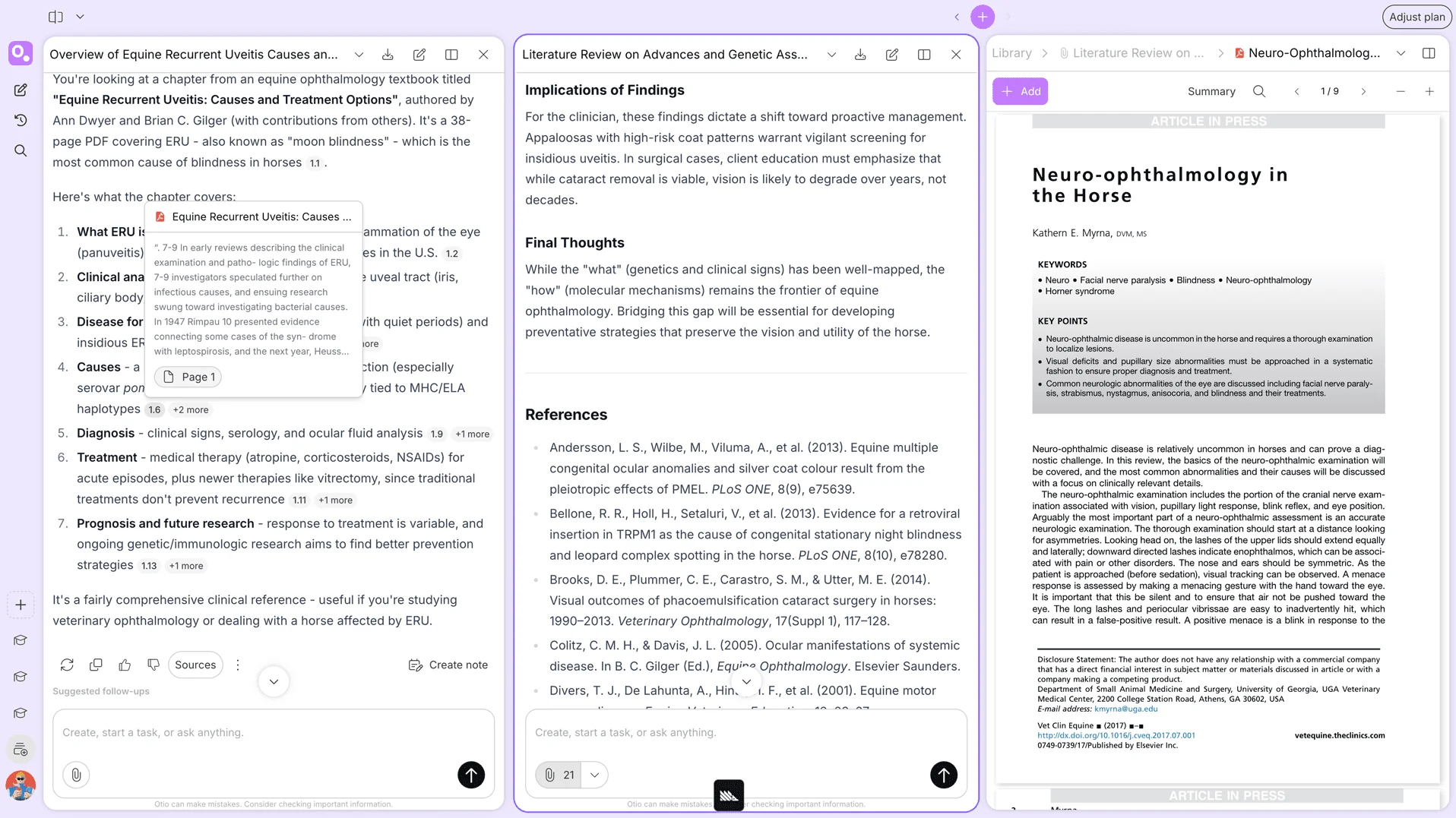
In short
Otio is an AI research assistant that lets you upload a textbook as a PDF or ePub and ask questions about specific chapters. Instead of a static summary, Otio surfaces the exact passage and cites the page number, so you know where to review. You can add lecture slides and course papers to the same workspace, choose the AI model that fits your discipline, and keep the textbook available all semester.
- 200,000+professionals across 74 languages trust Otio
The problem
Why Generic Summaries Miss What Actually Matters
Summaries Answer Questions You Didn't Ask
A static summary of chapter 8 gives you an overview. But when the exam question asks about a specific theory mentioned on page 142, the summary doesn't help.
MoreLess
Targeted questioning lets you ask exactly what you need to know. Otio finds the passage and cites the page so you know where to review.
Textbooks Don't Exist in Isolation
Your professor assigned the textbook alongside lecture slides, supplementary papers, and case studies.
MoreLess
Understanding how they connect is what exams actually test. Managing these across multiple tools means you lose the thread. Otio puts them in one workspace so you can ask questions that span all your course materials.
Dense Technical Content Loses Precision in Paraphrasing
Medical textbooks, legal codes, and engineering manuals resist generic summarization.
MoreLess
The summary loses the technical detail you need for exams. Otio extracts the actual passage from your uploaded textbook. Precision stays intact because you're working from the source text, not a paraphrase.
One Summary Doesn't Serve a Whole Semester
Week one, you need an overview. Week eight, you need to understand a specific argument.
MoreLess
Week twelve, you need to review key concepts before the final. A static summary can't adapt. Otio lets you ask new questions from the same textbook across the entire semester.
Ask Targeted Questions, Get Cited Answers
Upload Your Textbook in PDF or ePub Format
Drag your textbook file into Otio or connect Google Drive, Dropbox, OneDrive, or Box.
MoreLess
The textbook stays in your workspace permanently. Many institutional textbooks are distributed as ePubs. Otio handles both formats so you can work with whatever your course provides.
Ask Chapter-Specific Questions
Instead of reading chapter 8 linearly, ask what it says about a specific concept.
MoreLess
Otio surfaces the relevant passage and cites the exact page. Before your exam, ask targeted questions about the concepts you need to review. Know exactly where to go in the textbook for deeper study.
Cross-Reference With Lecture Slides and Course Papers
Add your lecture slides and supplementary readings to the same session.
MoreLess
Ask a question that spans the textbook and the papers your professor assigned. Otio shows you how the sources connect. Every answer cites back to the exact page or slide so you can verify and review.
Choose the AI Model That Fits Your Discipline
Technical content benefits from model flexibility. Choose the AI model best equipped to handle medical terminology, legal reasoning, or engineering concepts.
MoreLess
Otio consolidates multiple AI models in one workspace. No more copying prompts between ChatGPT, Claude, and Gemini.
Targeted Questioning, Not Static Summaries
-
Ask Specific Questions Instead of Reading Generic Summaries
Most tools generate a static summary of each chapter. When the exam asks about a specific concept, the summary doesn't help.
MoreLess
Otio lets you ask what chapter 6 says about X. The answer cites the exact page so you know where to review.
-
Permanent Workspace, Not One-Time Summaries
Upload your textbook once. Ask different questions across twelve weeks of study.
MoreLess
Other tools treat each session as disposable. Otio keeps your textbook available all semester so your study system grows with you.
-
Cross-Source Capability for Multi-Material Courses
Add your textbook, lecture slides, and supplementary papers to one workspace. Ask questions that span all three.
MoreLess
Exams test synthesis across materials. Otio makes that synthesis visible and traceable with page-level citations.
-
Every Answer Cites the Exact Source
Otio works from the file you uploaded, not from general training data.
MoreLess
Every answer traces back to the exact page or passage. No hallucinated references. No invented page numbers. Verify everything in one click.
-
Model Flexibility for Technical Content
Choose the AI model best suited to your discipline. Medical, legal, and engineering textbooks require precision.
MoreLess
Otio consolidates ChatGPT, Claude, Gemini, and other models in one workspace. No more copying prompts between tools.
Who it's for
Built for Students in Demanding Programs
Based on Otio's onboarding data from the past 90 days, 39% of users (687 of 1,750) select 'Literature reviews' and 37% select 'Study & exam prep' - together, these academic use cases account for the largest concentration of student and researcher activity on Otio.
Medical Students Managing Dense Anatomy and Pharmacology Texts
Medical textbooks are hundreds of pages of technical content.
MoreLess
Ask Otio what chapter 12 says about a specific drug mechanism and get the exact passage with the page number. Generate practice questions from your uploaded textbook. Create mnemonics and analogies to help concepts stick.
Law Students Working Through Case Law and Legal Codes
Legal textbooks and case compilations require precise extraction.
MoreLess
Ask Otio to pull key facts, themes, and contradictions across multiple documents. Every answer cites back to the exact source. Verify everything before it goes into your case brief or exam answer.
Engineering Students Reviewing Technical Manuals and Problem Sets
Engineering textbooks are dense with formulas, diagrams, and technical specifications.
MoreLess
Ask targeted questions to extract the specific concept you need. Cross-reference your textbook with lecture slides and problem sets. See how the theory connects to the application.
Business and Finance Students Synthesizing Case Studies and Theory
Business textbooks pair theory with case studies. Ask Otio to pull arguments across both and show how they connect.
MoreLess
Before exams, ask targeted questions about frameworks, models, and case applications. Know exactly where to review.
Graduate Students Managing Thesis Research and Literature Reviews
Upload your textbook alongside research papers and course materials.
MoreLess
Ask questions that span all your sources and get cited answers. Start your literature review from a structured synthesis, not a blank page. Every answer traces back to the exact page and passage.
The problem
Here's What the Old Way Actually Costs You
Time, money, and trust. The cost of stitching multiple AI tools together to do what one workspace should. Otio keeps your textbook in a permanent workspace. Ask new questions without re-uploading or re-pasting.
Stacking ChatGPT, Claude, Gemini, and Perplexity
Switching between tools because none does it all. Losing your train of thought somewhere in the middle.
MoreLess
Otio consolidates every AI model in one workspace. Your train of thought stays on the rails.
Hallucinated References and Invented Page Numbers
ChatGPT invents authors, fake journals, and page numbers that don't match.
MoreLess
You can't trust the output without manually verifying everything. Otio works from the file you uploaded. Every answer cites the exact page so you can verify in one click.
Reading You Should Have Done Tuesday
Falling behind on assigned reading and scrambling to catch up before exams.
MoreLess
Generic summaries don't help when the exam asks about a specific concept. Otio lets you ask targeted questions and find exactly what you need to review. Catch up faster without sacrificing comprehension.
How it works
Three Steps to Smarter Textbook Study
Otio is fast to set up and immediately useful. Three steps from textbook to cited answers.
- 1
Upload Your Textbook
Drag your textbook PDF or ePub into Otio, or connect Google Drive, Dropbox, OneDrive, or Box. The upload takes seconds.
MoreLess
The textbook stays in your workspace permanently. No need to re-upload for every new question.
- 2
Ask Targeted Questions
Ask what chapter 6 says about a specific concept. Otio surfaces the relevant passage and cites the exact page.
MoreLess
Add your lecture slides and course papers to the same session. Ask questions that span all your materials.
- 3
Review, Verify, and Study
Every answer cites back to the exact source. Click the citation to jump to the page in your textbook.
MoreLess
Use the cited answers to guide your review. Know exactly where to focus before your exam.
In their words
What people say
As a master's student, Otio has been a game-changer for my thesis work. It's like having a personal research assistant available 24/7! Chatting with research articles and whole folders of content has saved me countless hours of reading and digging through papers.
I use it for literally everything. Make practice questions, summarize lectures, give me analogies and mnemonics.
My brain isn't a filing cabinet. It's a processor. I had to stop asking it to store everything and start building an external system.
Otio is really an excellent tool for understanding my papers. It is just like my personal librarian for the internet!
Questions
Upload Your Textbook and Ask Specific Questions
Does Otio Read the Actual Textbook I Upload or Generate From Training Data?
Otio works from the file you upload, not from general knowledge about popular textbooks. Every answer is generated from the material you've provided. This matters for specialized or proprietary academic texts. Otio reads your specific edition, your specific chapters, your specific content.
Can I Ask Questions About Specific Chapters or Sections?
Yes. Ask what chapter 6 says about a specific concept, and Otio surfaces the relevant passage with the exact page number. Targeted questioning means you get the answer you need, not a generic summary of the entire chapter.
Can I Use My Textbook Alongside My Lecture Slides and Course Papers?
Yes. Add your textbook, lecture slides, and supplementary readings to the same workspace. Ask questions that span all three sources. Otio shows you how the materials connect and cites back to the exact page or slide. This is how students actually study for exams.
Does Otio Accept ePub Files as Well as PDFs?
Yes. Many institutional textbooks are distributed as ePubs through course management systems. Otio handles both PDF and ePub formats. Upload whatever format your course provides. Otio works with both.
Does the Textbook Stay Available Across a Whole Semester or Just the Session I Upload It In?
The textbook stays in your Otio workspace permanently. Upload it once in week one, and it's available through finals. Ask different questions before each lecture, before midterms, before the final. Same upload, new questions, cited answers every time.
Can Otio Generate Practice Questions From My Textbook?
Yes. Ask Otio to generate practice questions, create mnemonics, or provide analogies based on your uploaded textbook. Medical students use this to prepare for exams. Law students use it to test their understanding of case law. The tool adapts to your study needs.
Will Otio Work on Technical Textbooks, Not Just General Reading?
Yes. Medical, legal, engineering, and finance textbooks require precision. Otio extracts the specific passage you need, not a paraphrased generalization. Choose the AI model best suited to your discipline. Targeted questioning preserves technical accuracy.
How Is This Different From Just Using ChatGPT?
ChatGPT forgets your textbook after each session. You have to copy-paste passages repeatedly, and it often hallucinates references. Otio keeps your textbook in a permanent workspace, cites every answer back to the exact page, and consolidates multiple AI models so you don't have to switch tools.
Keep exploring
AI book summarizer
Upload a book, ask about any chapter and get answers tied to the page.
OpenMultiple AI models
ChatGPT, Claude, Gemini and more in one workspace. Put two answers side by side.
OpenAI PDF reader
Ask across a whole library of PDFs. Every answer points to the page it came from.
OpenPricing
Free, Go and Pro, with what each plan includes.
Open