Webpage summarizer that stores every page you read
Save any article to your library and ask about it weeks later.
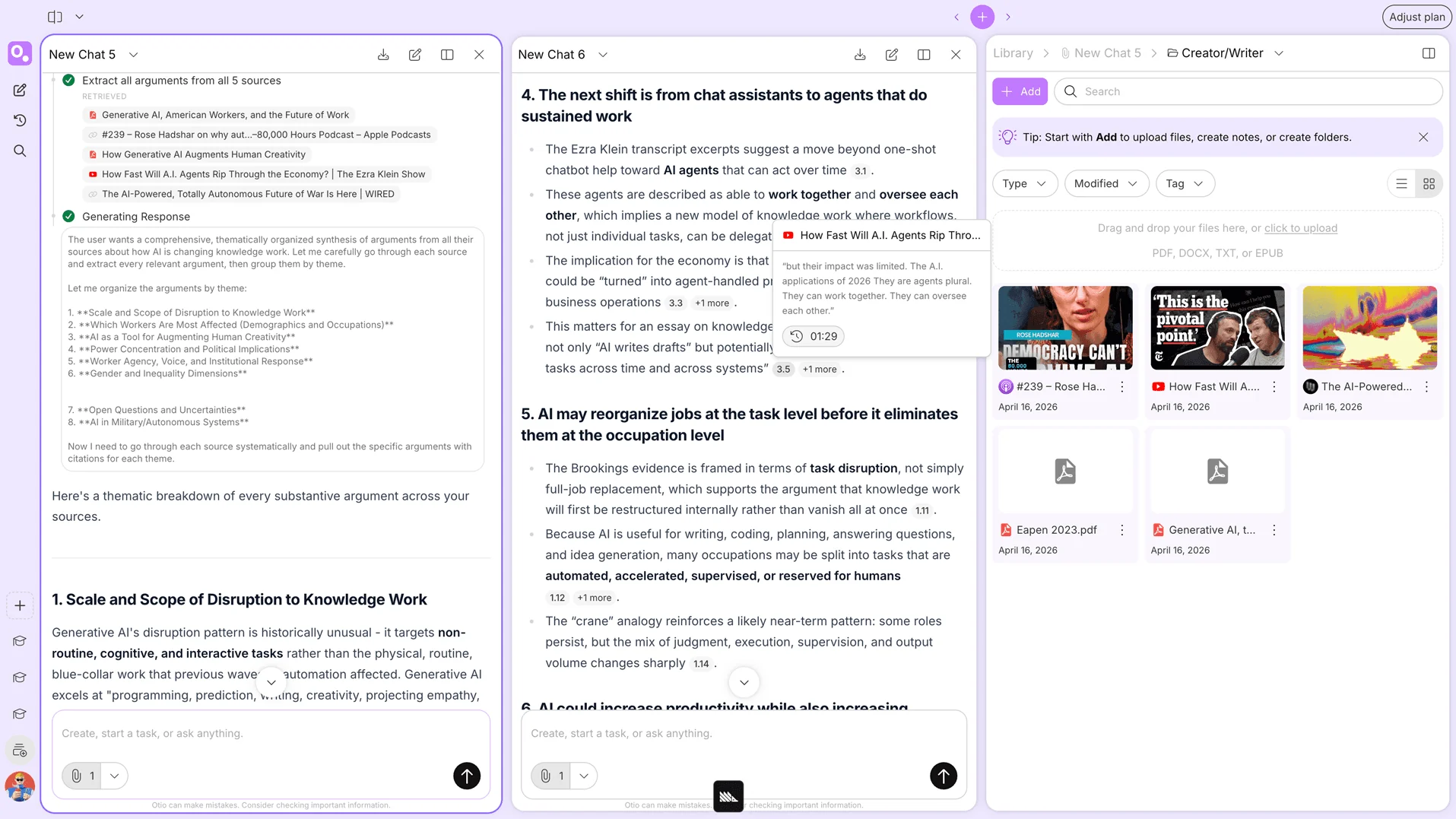
In short
Otio is an AI research assistant that summarizes any webpage and stores it permanently in your workspace. Paste a URL or capture the page with the Chrome Extension, get a structured summary with citations, then return weeks later to ask new questions. Pages can be cross-referenced with PDFs, YouTube videos and podcasts in one session, using the AI model of your choice.
- 200,000+Professionals worldwide
- 74Languages supported
- EverySource you read becomes searchable
Browser extensions give you a summary then it's gone
Otio stores every webpage you summarize so you can return to it weeks later, ask new questions, and cross-reference it with other sources.
The problem
What happens after you summarize a webpage?
Three weeks later, you need that source again. The summary is gone. The insight is lost. Starting from scratch wastes the time you thought you saved.
You get the summary, then forget it
Browser extensions are built for single-session speed. Three weeks later, you need that source again.
MoreLess
The summary is gone. Starting from scratch wastes the time you thought you saved.
Bookmarks pile up, nothing gets absorbed
Dozens of pages sit in your "need to read" folder. The backlog grows. Nothing is actually absorbed or actionable.
MoreLess
Bookmarking isn't a research system - it's a procrastination folder.
Web content lives in isolation
A webpage often references a PDF. Or there's a YouTube interview with the author.
MoreLess
No browser extension handles all of them in one place. Your research stays fragmented across three tools and ten tabs.
No follow-up questions, no cross-reference
Single-use summarizers give you the summary and stop. If you need to know what that page said about a specific topic, you're re-reading it manually.
MoreLess
No way to ask one question across five sources.
Summarize the page. Store it forever. Ask it anything.
Paste a URL. Otio summarizes the page and stores it in your workspace - permanently. Six weeks later it's still there, still queryable, still answering with citations.
Every URL becomes permanent
Not a session summary. Every webpage you add is stored in your workspace, searchable and queryable for as long as you need it.
Ask long after you've moved on
Other summarizers stop after the summary. Otio lets you keep asking. What does this say about X? How does it compare to last week's report?
Combine URLs, PDFs, videos, podcasts
A webpage links to a PDF. There's a YouTube interview. All handled in the same library, queried with one question across every source.
Choose any AI model
Switch between ChatGPT, Claude, Gemini, and Perplexity without leaving your workspace. Compare how different models interpret the same source.
How it works
Three steps from URL to insight
Paste any URL or use the Chrome Extension to capture pages directly. Get a structured summary with citations. Ask follow-up questions any time after.
- 1
Paste any URL or use the Chrome Extension
Copy the URL of any webpage and paste it into Otio. Or use the Chrome Extension to capture the page you're currently viewing.
MoreLess
No copy-pasting text, no manual formatting.
- 2
Get a structured summary with citations
Otio summarizes the page and cites every key point back to the exact source.
MoreLess
Choose your AI model: ChatGPT, Claude, Gemini, or Perplexity. Stored permanently in your workspace.
- 3
Ask follow-up questions any time
Come back tomorrow, next week, or three months later. Ask new questions, cross-reference with other sources.
MoreLess
Every answer cites the exact passage. Verify in one click.
Turn 100 tabs into one queryable library
The tab-hoarding problem isn't a focus problem - it's an organisation problem. Otio solves it structurally.
-
Ask one question across 20 URLs
Stop reading every page manually. Paste your URLs. Then ask: what are the key themes across these sources?
MoreLess
Get a structured answer pulling from all 20, with every claim cited back to the exact source.
-
Reference web content from months ago
The page you summarize today is still useful in three months. Search your library, find the source, ask new questions.
MoreLess
Your research compounds - every page you add makes the library smarter.
-
Triangulate articles, PDFs, and video
Summarize the web page. Drop in the PDF it references. Watch the YouTube interview with the author.
MoreLess
Ask one question across all three. Otio handles every format in the same session.
-
Build a research trail, not a reading list
Every URL you add connects to the others. Ask how sources agree or contradict. Pull quotes that support your argument.
MoreLess
Export when ready. Summarizing becomes the start of a research trail, not just a time-saver.
How it compares
Built for research, not just reading speed
Browser extensions are great for speed. They give you a flash summary while you're on the page, then it's gone. Otio is for what comes next.
Extensions are fast, but the summary disappears
Glasp and Eightify give you a flash summary on the page. Excellent for on-the-fly reading.
MoreLess
But the summary disappears when you close the tab. Otio stores what you summarize so you're not starting from scratch next time.
Single-use tools don't let you follow up
TLDR This and NoteGPT process the URL and give you the summary. Then they stop.
MoreLess
Otio gives you the summary and then lets you keep asking - every answer cited back to the source.
URLs, PDFs, videos, podcasts in one workspace
Browser extensions only work on webpages. Document tools only work on PDFs. Video summarizers only on YouTube.
MoreLess
Otio handles all of them in the same session, with the speed of an extension and the depth of a research tool.
Who it's for
Who uses Otio to summarize and store webpages
Researchers, journalists, consultants, students, analysts. Anyone managing web research at scale.
Researchers
Upload 50 web articles, preprints, and blog posts. Ask Otio to pull key themes and arguments across everything.
MoreLess
Start your literature review from a structured synthesis, not a blank page.
Journalists
Paste URLs from news sites, press releases, investigative reports.
MoreLess
Ask Otio to pull contradictions, timelines, and key quotes. Your fact-checking stays fast - every claim traced.
Consultants
Upload market analysis, competitor pages, industry reports. Pull trends and data points across everything.
MoreLess
Build your deliverable on a structured summary in a fraction of the time.
Students
Paste assigned readings, supplementary articles, lecture transcripts. Ask Otio to pull key takeaways grouped by theme. Your library grows with every course.
Analysts
Upload data-heavy webpages, research reports, market analysis. Extract specific figures without reading every page.
MoreLess
Build visualisations from your CSVs. Verify everything before it leaves your desk.
Connect your existing research tools
Import sources from Google Drive, Zotero, Mendeley, Dropbox, OneDrive, and Box. Use the Chrome Extension to capture pages from your browser. Your library doesn't start from scratch - it starts with everything you've already collected.
Chrome Extension
Capture pages from your browser
Google Drive
Import sources directly
Zotero & Mendeley
Bring in your existing library
Dropbox, OneDrive, Box
Files where they already live
In their words
What people say
As a master's student, @otio has been a game-changer for my thesis work. It's like having a personal research assistant available 24/7! Chatting with research articles and whole folders of content has saved me countless hours of reading and digging through papers.
Masters Student
@otio is really an excellent tool for understanding my papers. It is just like my personal librarian for the internet!
Neuroscience PhD
I took a 2 hour YouTube video and had the AI in Otio summarise it. I then asked follow-up questions about the highlighted pieces that got my attention. All told, I was able to collect key takeaways in less than 10 mins. Amazing.
Researcher
I was fed up fighting with ChatGPT every time I wanted to do a deep dive on a library of research papers I had collected. It's the small things that made me switch - can't recommend it enough.
Policy Analyst
I've been using Otio for a while now and I must say how much I like it! It’s incredibly helpful for summarizing key takeaways from research papers and long videos or podcasts, knowing from the start if the research is what I’m looking for and then allowing me to revisit important points precisely when I need them.
Economist
Truly loved interface: it’s very straight forward and intuitive vs other ai's. Especially vs having 100 tabs open and copy & pasting back and forth from ChatGPT
Pharmaceutical Researcher
Questions
Frequently asked
Can Otio summarize any webpage, or only articles?
Otio works with most web content: news articles, blog posts, research reports, landing pages, and long-form content. If the page has readable text, Otio can summarize it. Some paywalled content may have limitations — use publicly accessible URLs for best results.
What sources can Otio summarize?
Otio summarizes PDFs, web articles, YouTube videos, podcasts, web pages, spreadsheets, and ePubs. You can mix formats in one project with no source limits and no file upload caps.
Does Otio cite sources in its summaries?
Yes. Every answer cites the exact page number for PDFs or timestamp for audio and video. Click any citation to open the original passage.
Which AI models does Otio use?
You choose: ChatGPT (GPT-4o), Claude, Gemini, Grok, Llama, DeepSeek, and more. All models are available on every tier including the free plan.
How is Otio different from NotebookLM?
Otio has no source cap per project, supports more formats, and lets you choose any AI model. Every answer cites the exact page or timestamp. You can also turn any summary into an editable Otio Note.
What does Otio cost?
Otio has a free plan with daily usage. Paid tiers start at Lite ($7/mo), Go ($36/mo), and Pro ($90/mo). All features are available on every tier. Annual billing saves 50%.
Keep exploring
YouTube video summarizer
Paste a link, get a summary with timestamps, and keep the video as a source you can question.
OpenAI PDF reader
Ask across a whole library of PDFs. Every answer points to the page it came from.
OpenAI podcast summarizer
Turn an episode into notes and keep it in your library for follow-up questions.
OpenMultiple AI models
ChatGPT, Claude, Gemini and more in one workspace. Put two answers side by side.
OpenStart your permanent research library today
7 days free. Every AI model. Cited answers. Every URL you summarize, stored permanently.
Start free